CRM KitsChurches: facilities, rooms and calendar
Every room and every hour, on one calendar.
A workspace for the church office that books its own building all week: Sunday services and classes, midweek groups, staff meetings and outside use by families and neighbors. Every room is a row and the next seven days run by the clock, with room conflicts, waiting requests, rental agreements and deposits, and setup and AV tickets leading the week. Lintel records what the office decided and never approves a booking by itself.
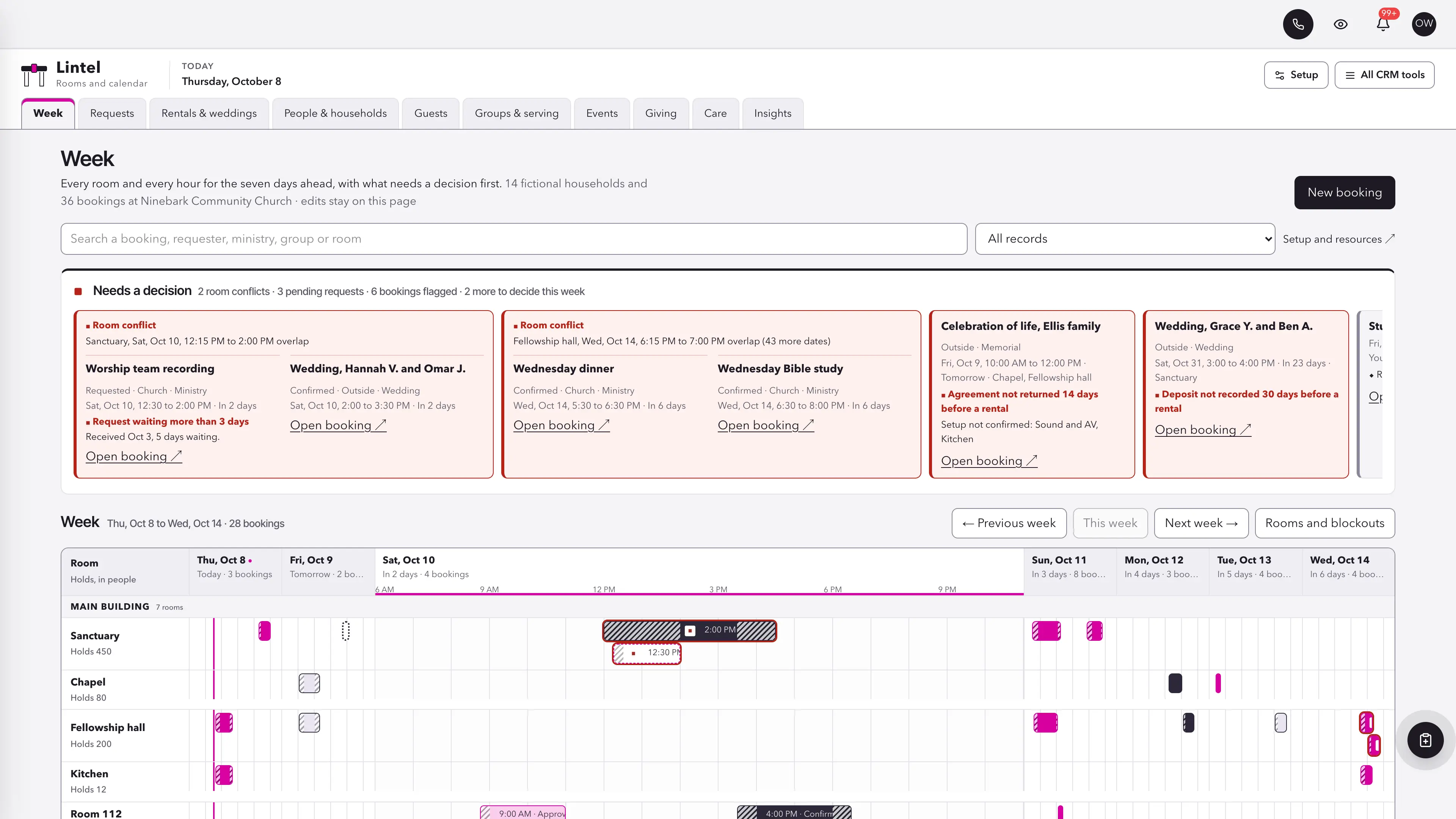
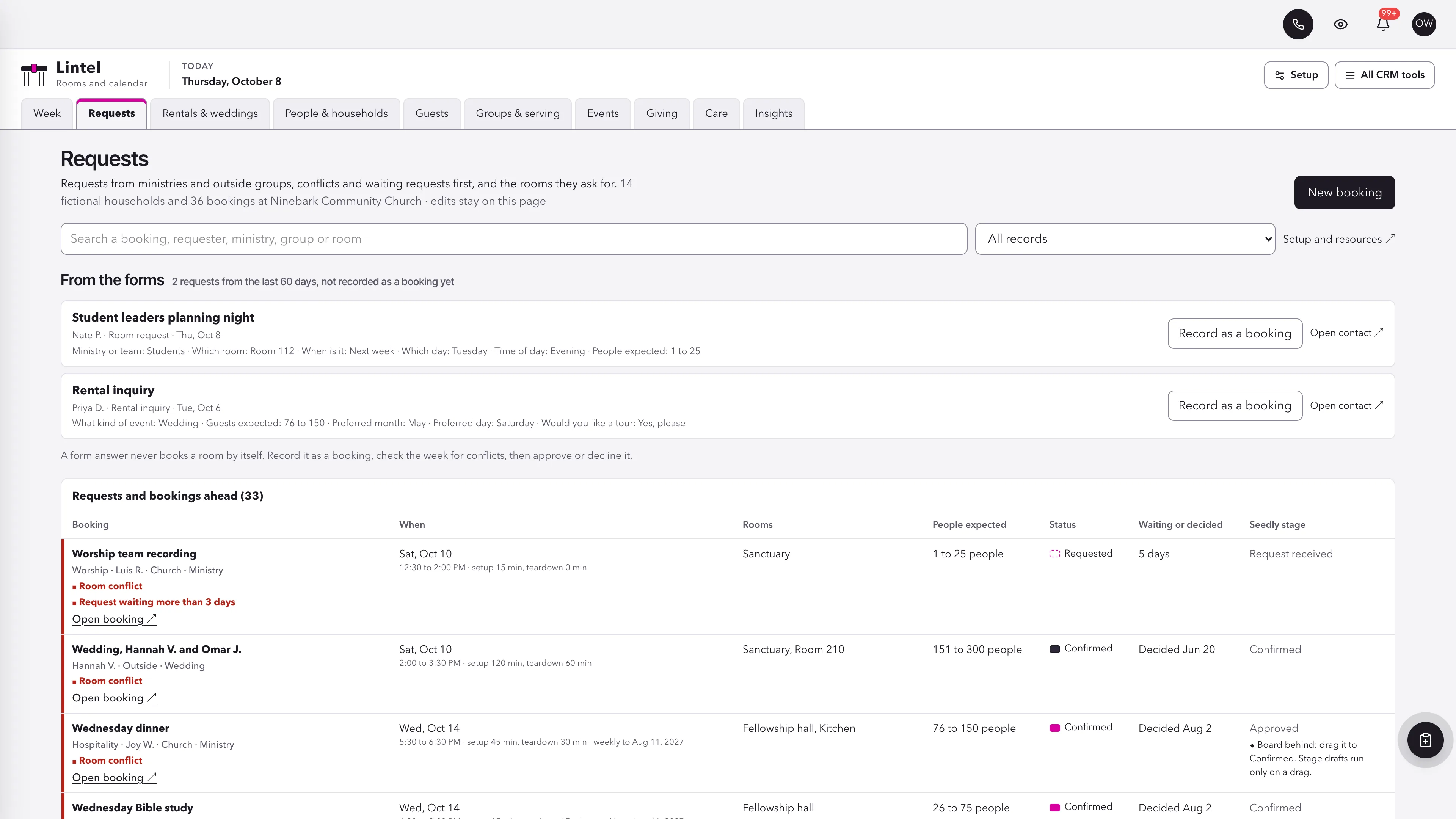
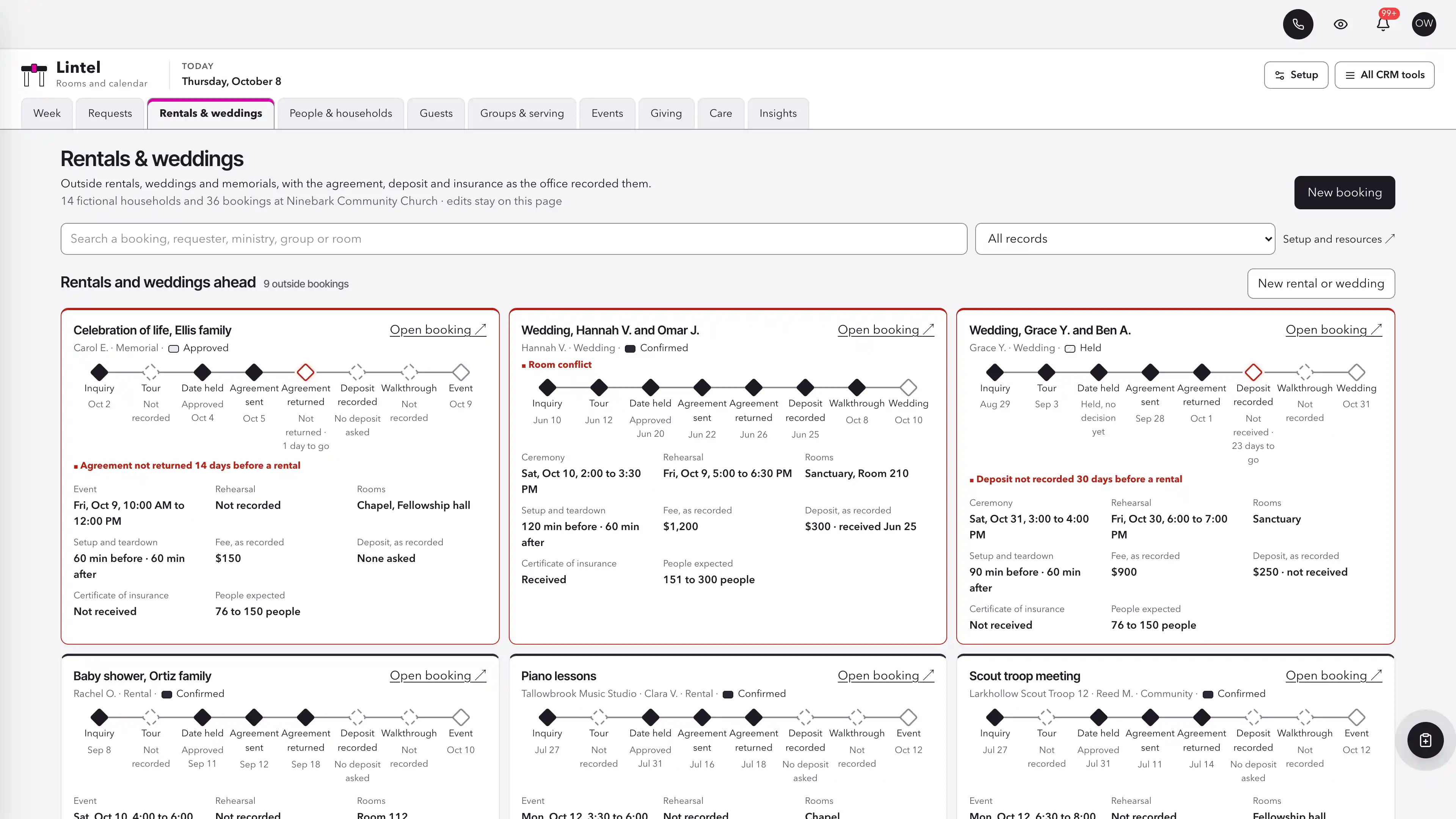
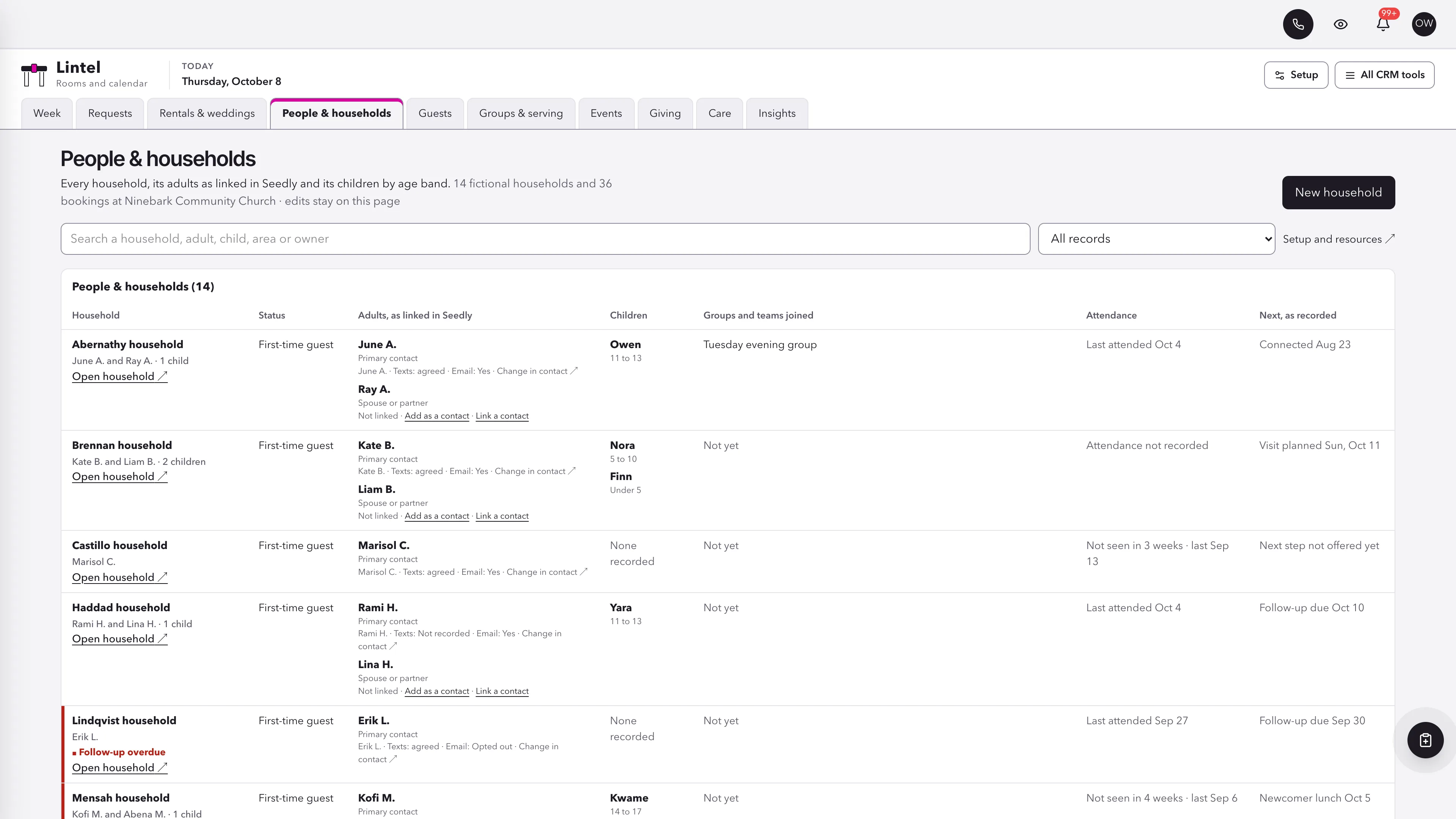
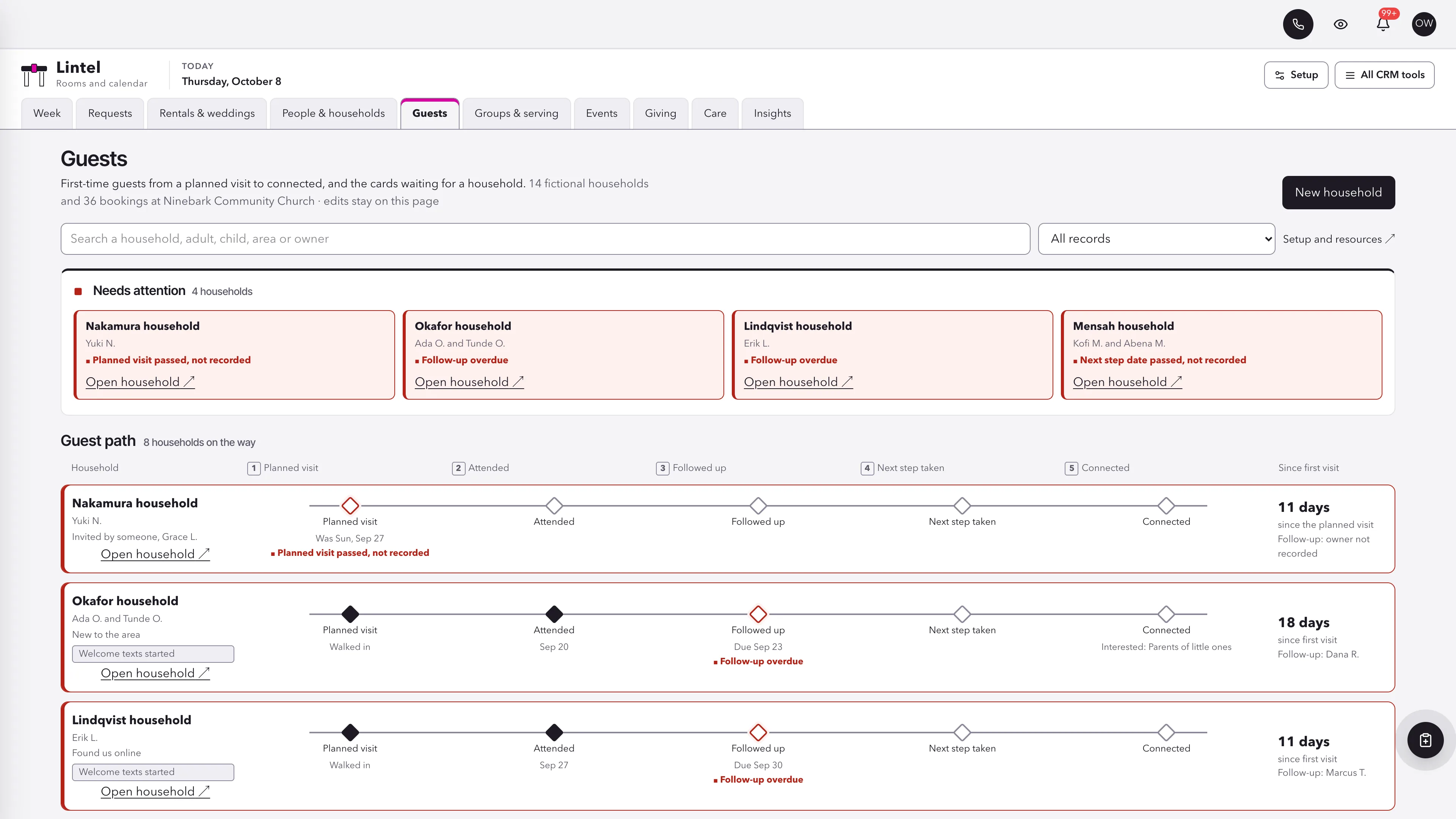
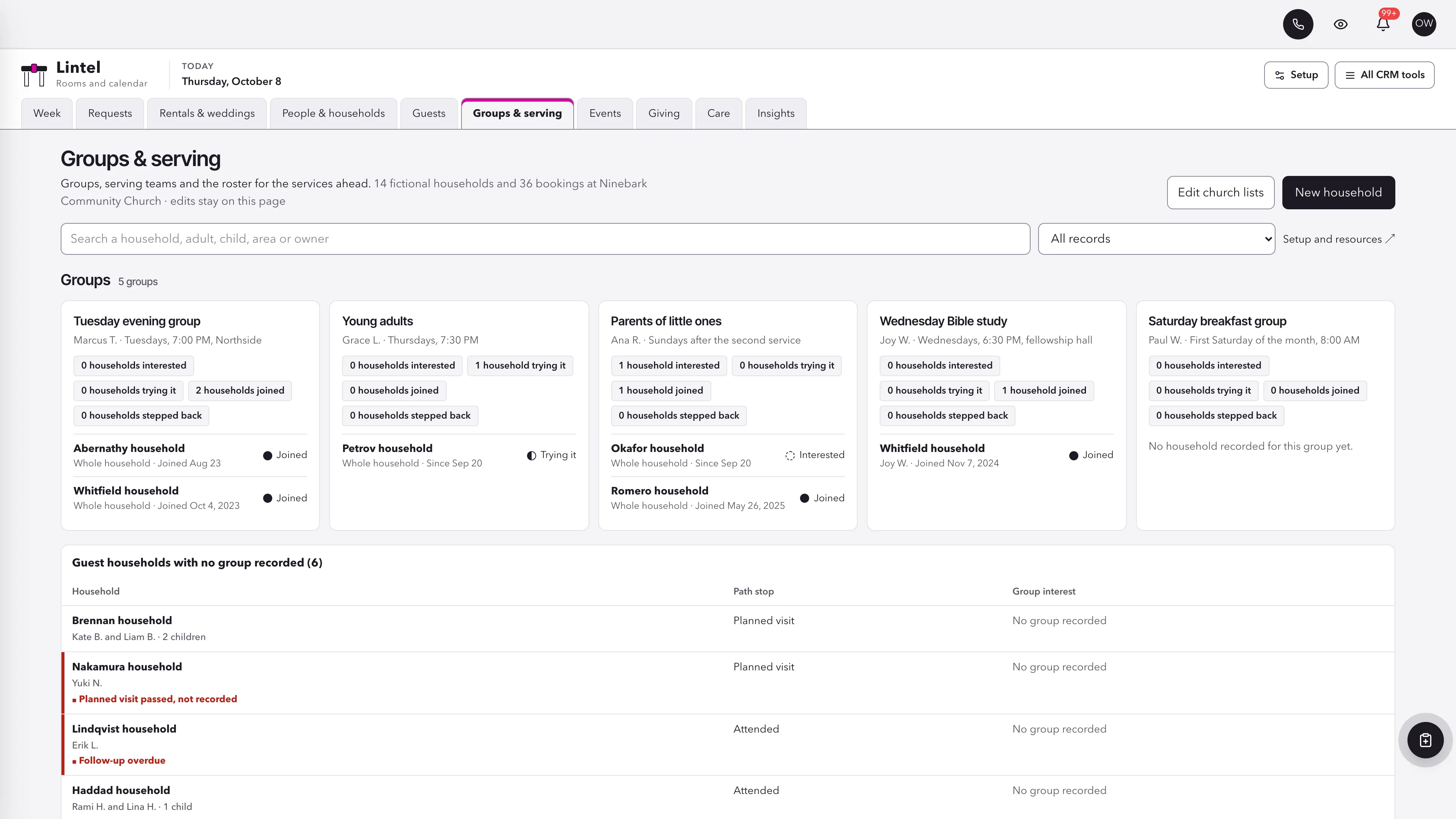
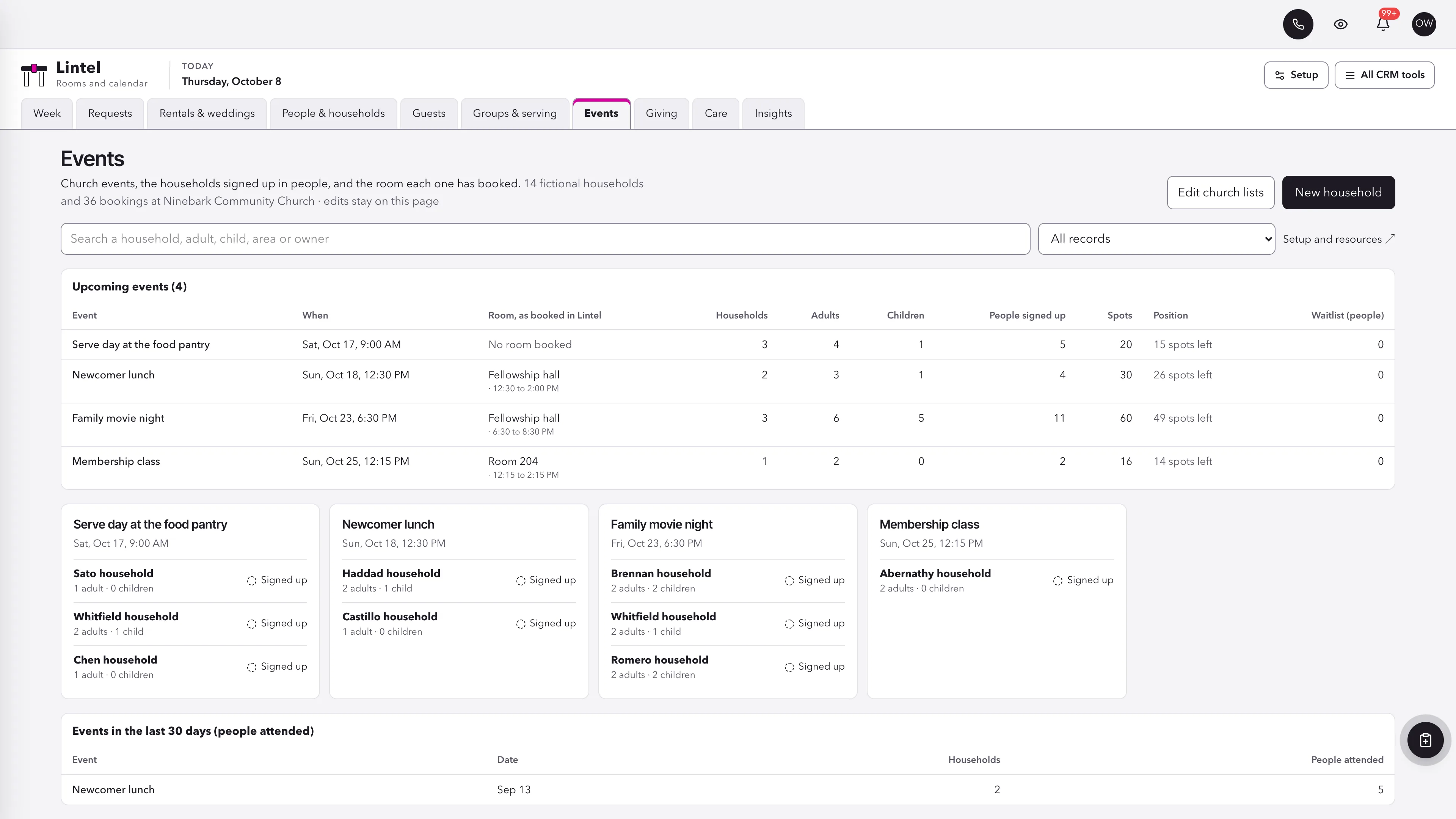
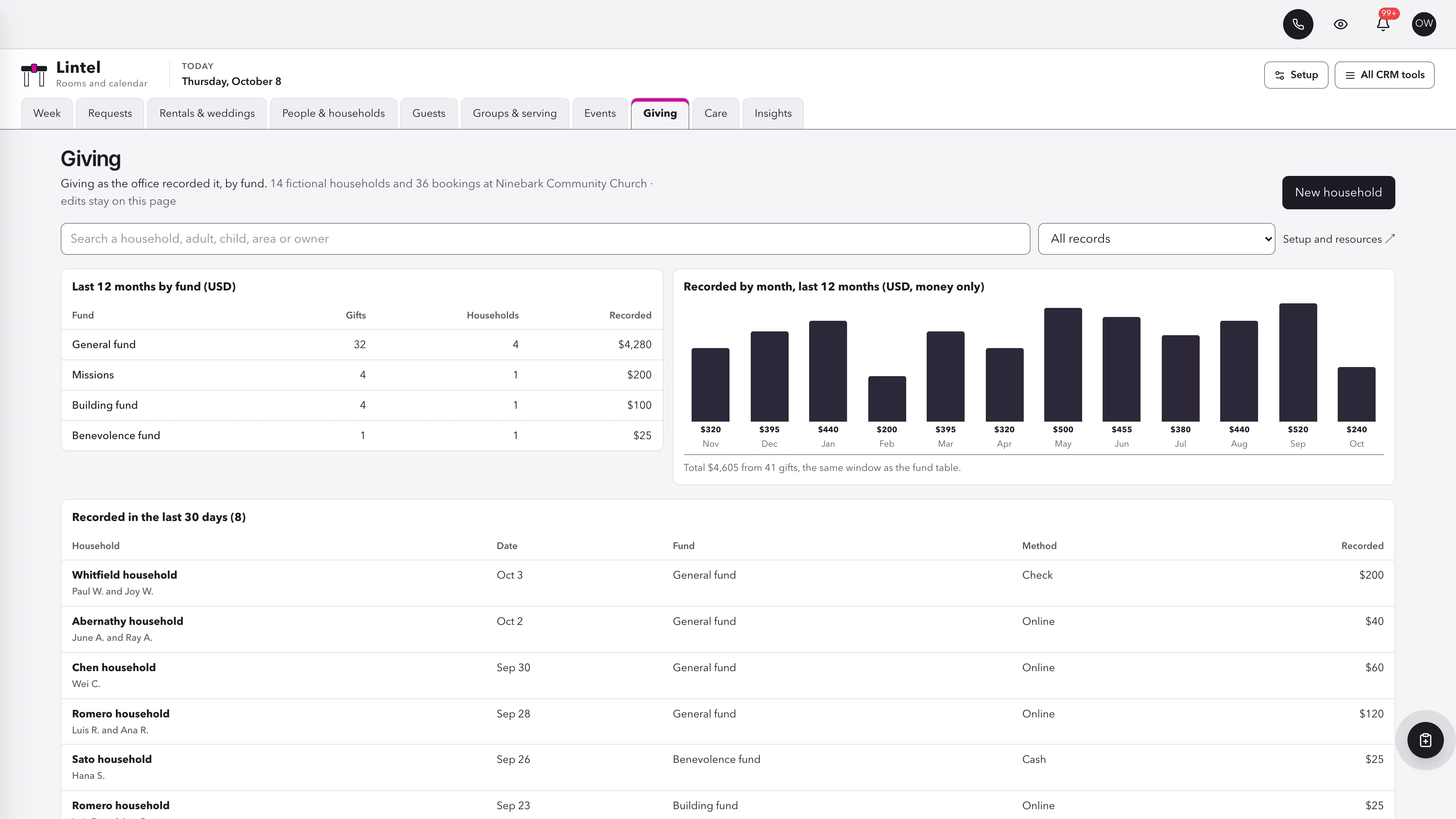
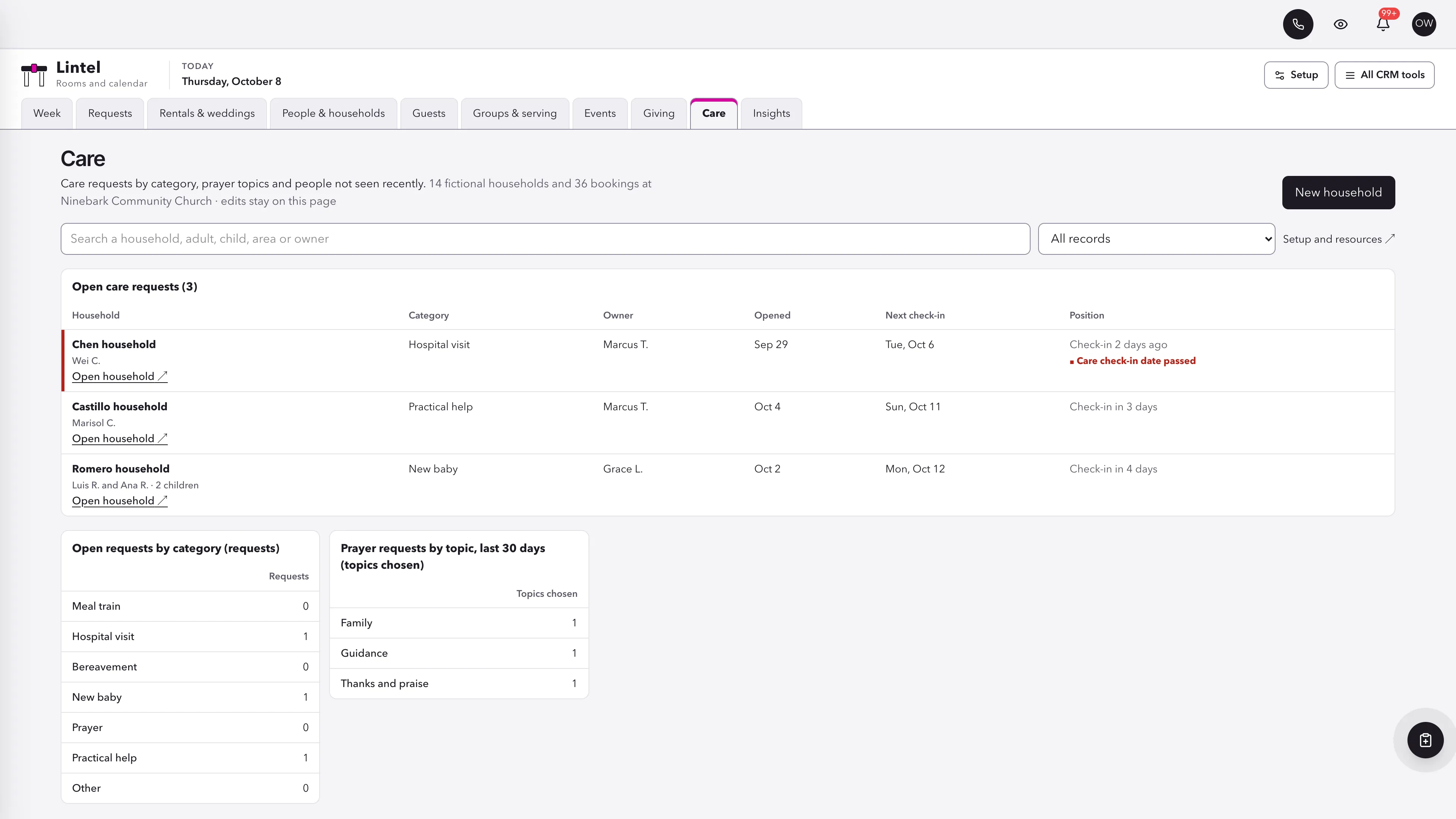
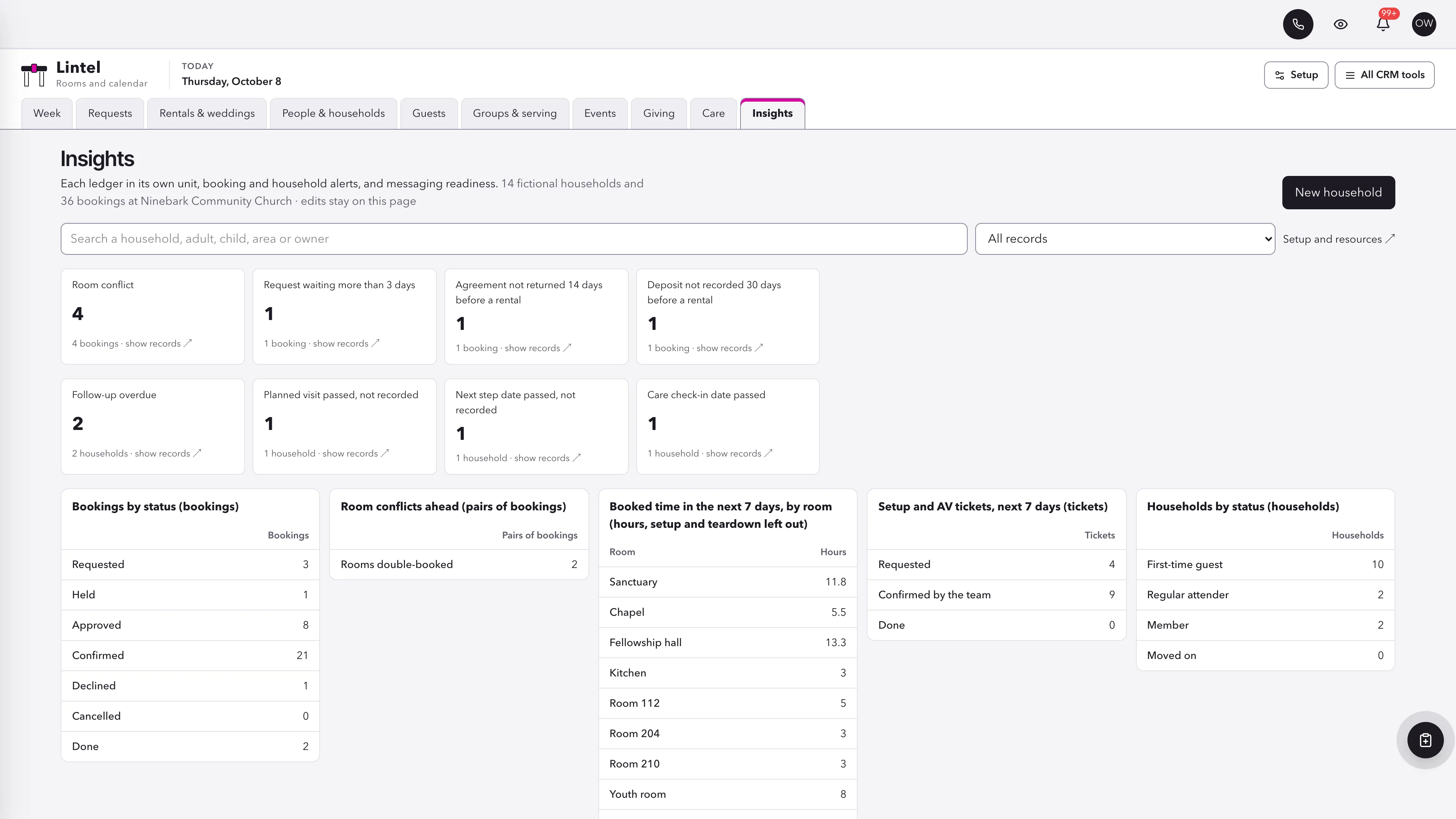
See every room by day and hour.
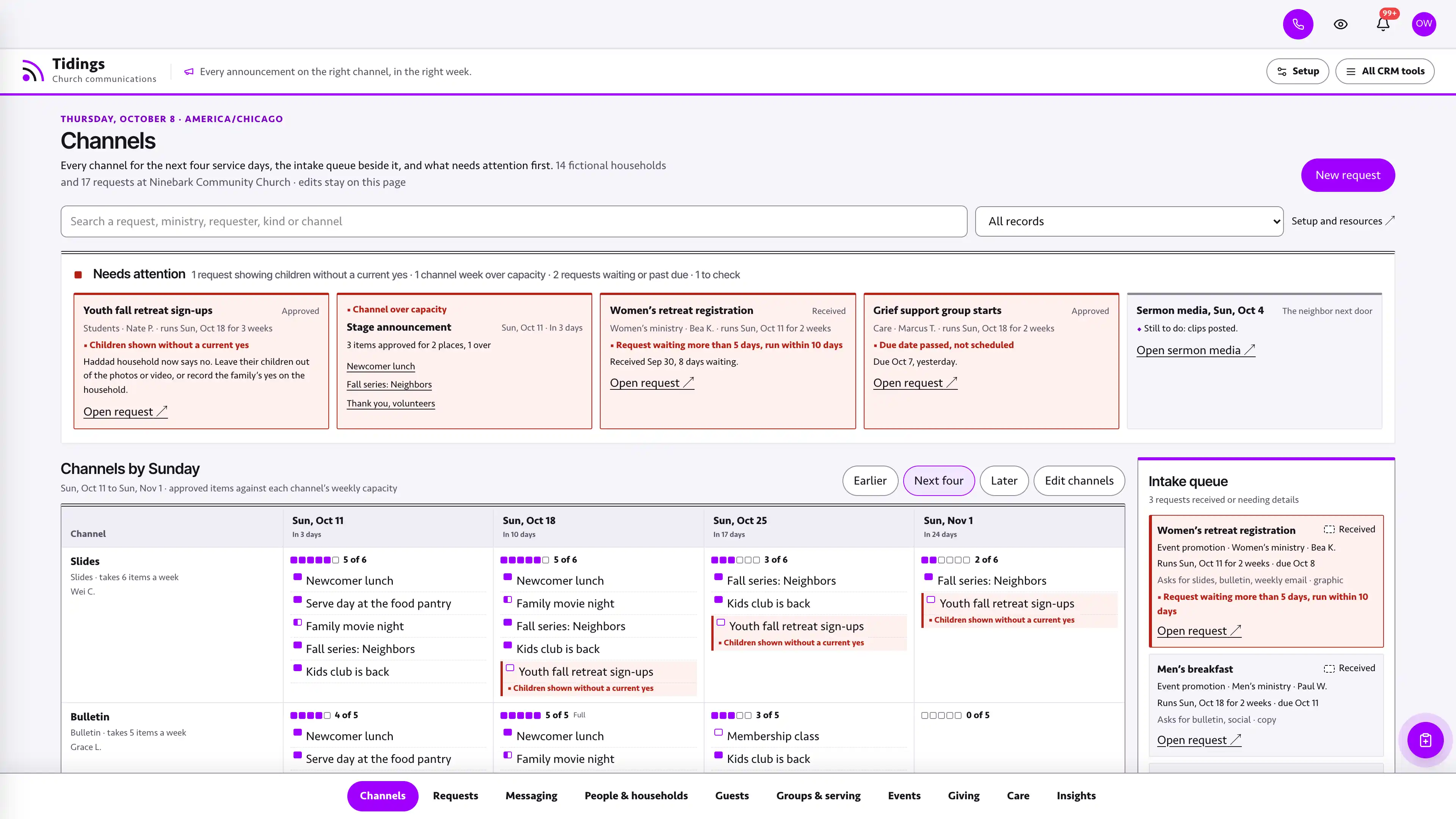
Rooms as rows, grouped by building, and the next seven days as columns, each booking a block placed by its clock times with setup and teardown hatched at its ends. Church bookings are fuchsia and outside ones ink, and requested, held, approved and confirmed each have their own shape and word. One day opens wide enough to read every block. Above the grid, Needs a decision shows each room conflict as one card naming both bookings, the room and the overlapping minutes, the booking awaiting a decision first, then requests waiting more than three days, rental agreements and deposits not recorded, and setup not yet confirmed.
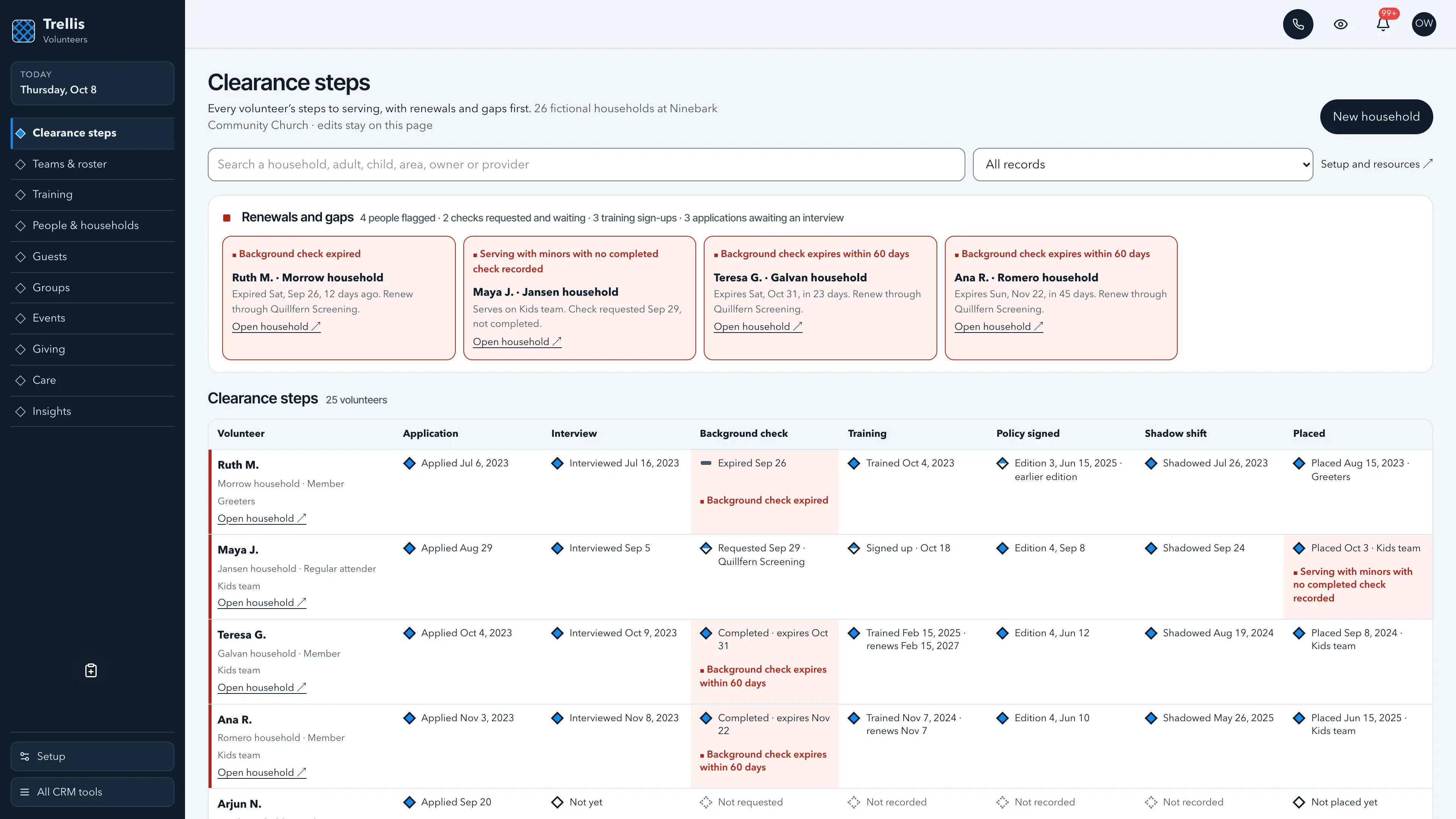
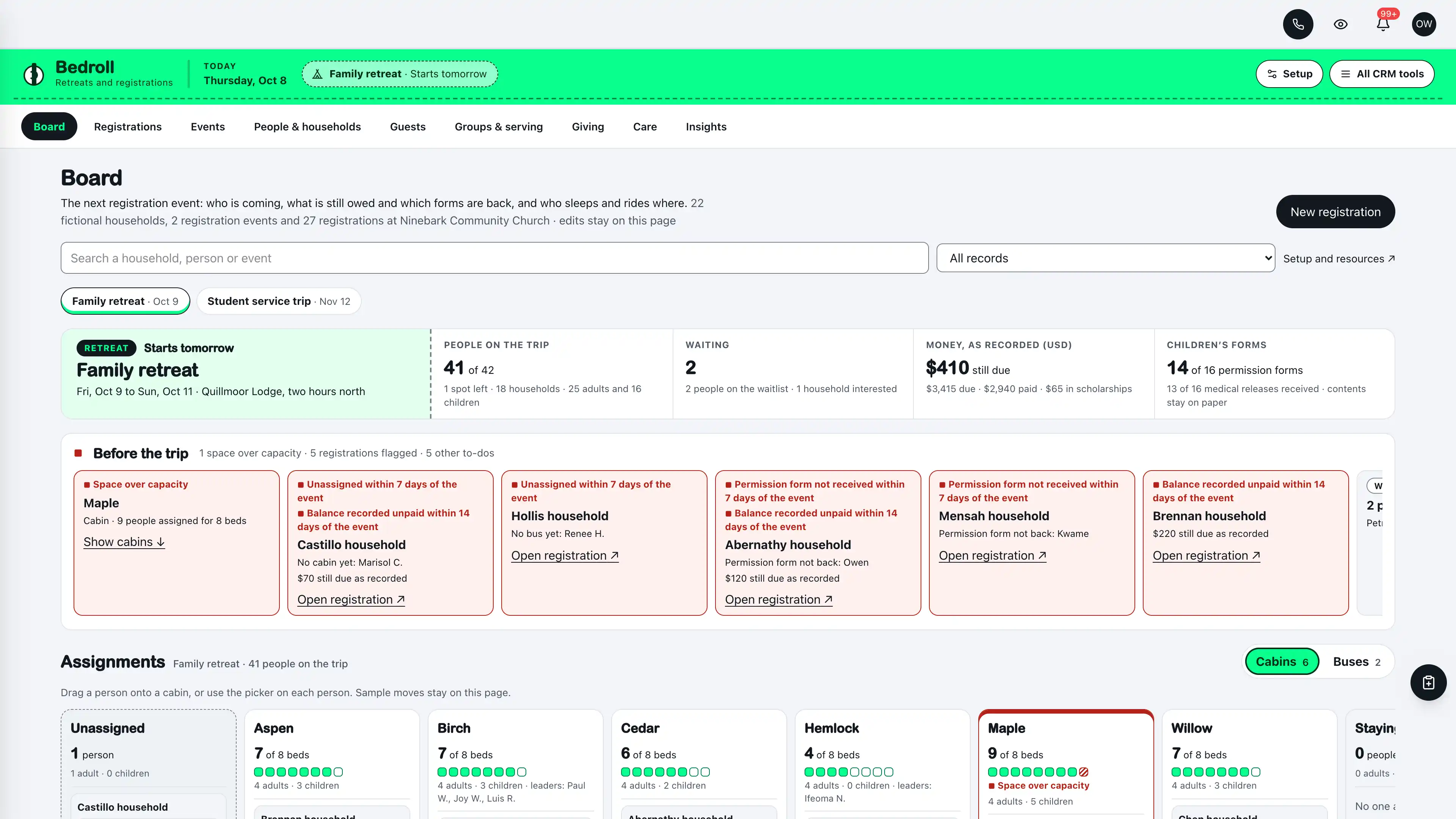
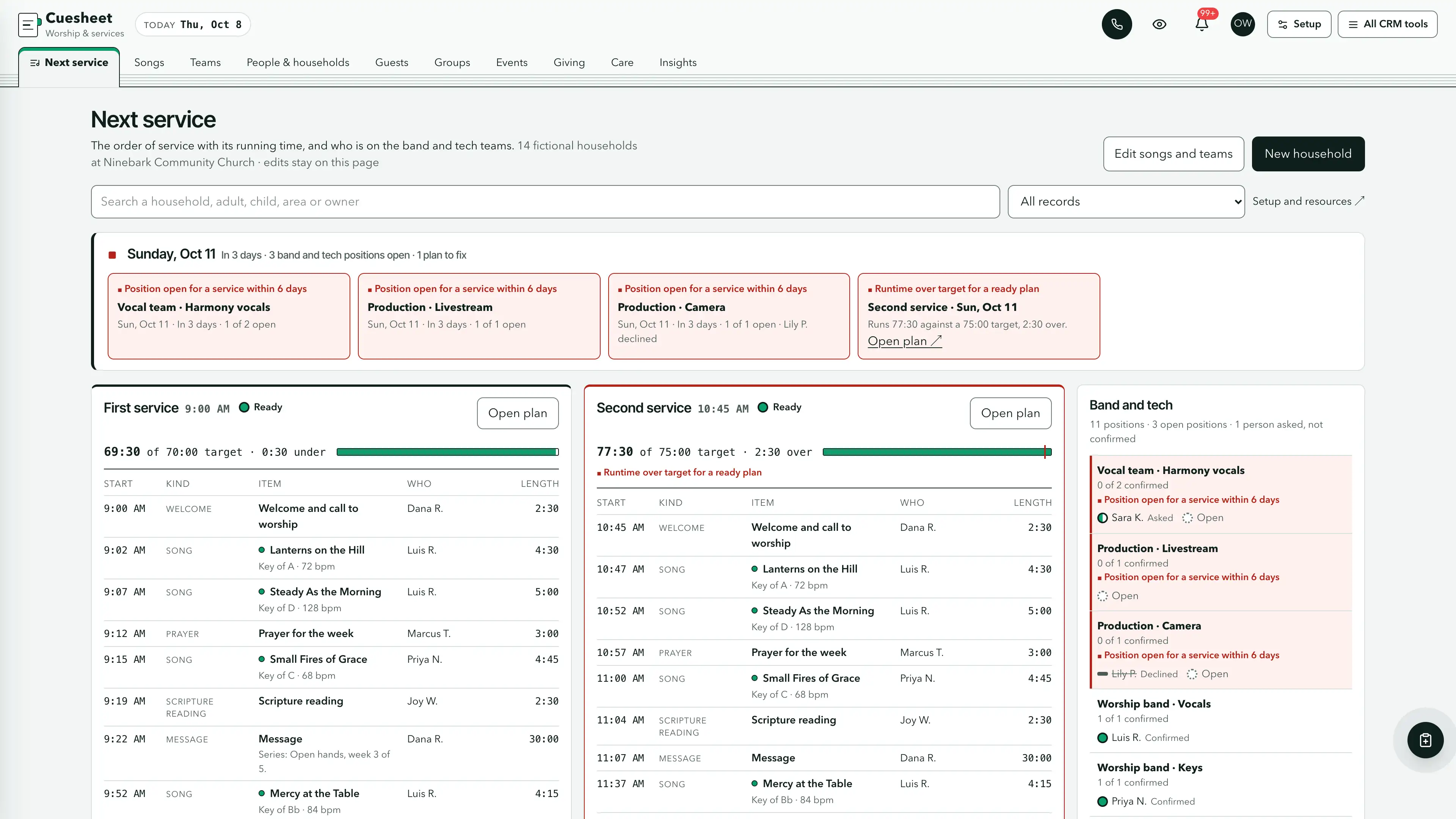
Actual interface captures with fictional sample data. Open a screenshot to see it full size.
What’s in the kit
Screens
- Week operating view with rooms by day and hour and the Needs a decision strip
- Requests with a form inbox, rooms and maintenance blockouts
- Rentals & weddings with each outside booking on its track
- People & households operating view
- Guest path with a card inbox
- Groups and serving roster operating view
- Events, giving as recorded, care and insights views
- Three message drafts in send mode with every send step off, plus thirteen task drafts
- Seven closed-choice native form drafts and five editable document templates
- Shared church tags, segments, a list, custom values, snippets, a connection card QR code and a pastor calendar
six pipelines
- Guest follow-up · 8 stages
- Serving teams · 7 stages
- Group leaders · 7 stages
- Care requests · 7 stages
- Facility requests · 7 stages
- Outside rentals & weddings · 8 stages
Optional. Install the ones that match your work, or connect drafts to a pipeline you already use.
16 workflow drafts
- Planned visit welcome
- First visit follow-up
- Next step invitation
- Next step check
- Group leader introduction
- Thirty-day check-in
- Serving team first conversation
- Serving roster confirmation
- Care request owner
- Request received
- Approval check
- Rental agreement follow-up
- Setup sheet the day before
- Guest welcome from the connection card (texts and emails, every send step off)
- Guest welcome after a recorded first visit (texts and emails, every send step off)
- Re-engagement (a text, a call, an email and a task, every send step off)
Inactive until you review and publish them. Message steps ship switched off.
Forms and documents
- Plan your visit
- Connection card
- Prayer request
- Serving team interest
- Event sign-up
- Room request
- Rental inquiry
- Membership covenant
- Volunteer policy
- Facility use agreement
- Wedding planning sheet
- Room setup sheet
Editable native forms and document templates. Forms collect information for staff review.
Sample workspace
Explore Ninebark Community Church, a fictional church with twelve rooms in two buildings and 36 bookings that put 28 on the week ahead: midweek groups, a Saturday wedding with its Friday rehearsal, a celebration of life with its agreement still out, a Wednesday dinner whose board is a stage behind, two room conflicts, three pending requests, two maintenance blockouts and 16 setup and AV tickets, on top of 14 households with children recorded as a first name and an age band, first-time guests, groups, a two-service roster, events, care requests and 41 recorded gifts. Sample edits stay in memory and reset on navigation or reload.
No sample customers are added to your CRM.
Setup and source
- Guided setup and compatibility report
- Private rollback receipt
- AI-agent guide for customized installations
- Original editable source, configuration, and tests
How setup works
Full installation guideCheck your Seedly
Extract the kit and run the guided setup. It checks your installation and flags customized files before it changes anything.
Connect the helper
Deploy the included helper from your backend source, then build your web app and choose any starter pipelines and drafts.
Make it yours
Set business name, descriptor, default pipeline name, booking currency and message mode. Then sign in and check the workflows and permissions your team uses.
Technical details and compatibility
Seedly CRM 5.8.4 · extension API 1. Node.js 20 or newer. The installer checks supported integration-file versions and does not deploy your web app or backend. The included original backend helpers are required for connected bookings, the rooms record, the form inbox, households, the church lists, linked contacts and setup. They preserve native account permissions, unrelated custom fields and row history, keep bookings, rooms, households, people, hours and money apart, refuse door and alarm codes, certificate and policy numbers, children's ages and names lists, allergy and custody notes, health details, logins, card and bank numbers and Social Security numbers as a guard against accidental entry rather than a guarantee, refuse dates still ahead for things that already happened, and check revisions before saving. To update, run the previous release's remove and this release's install in your Seedly working tree with no deploy or build in between, then deploy the backend, then build and deploy the web app; if remove refuses a file you edited, keep a copy of your edits, put the file back exactly as the previous release's installer wrote it (from your own commit made right after installing it, or by installing that release on a fresh copy of the same Seedly version and copying the file from there), remove and install, then re-apply your edits. Since 0.1.1 every helper an earlier page calls keeps its arguments and answers, so a page still open on the previous release keeps working between the two deploys. Pipelines, drafts, forms and documents are optional.
Each booking is an opportunity in Facility requests or Outside rentals & weddings, linked to the requester's contact, holding the title, kind, rooms, date, start and end as clock times, setup and teardown, a weekly repeat with skipped weeks, the status and the dates the request came in and was decided, the people expected, and for outside bookings the fee and deposit as recorded, whether an agreement is needed and its dates, the certificate of insurance as yes or no, the tour, walkthrough and rehearsal, plus setup and AV tickets. Rooms and maintenance blockouts live in their own account record. Households keep the shared church record: adults linked to Seedly contacts, children as a first name and an age band only, groups and teams, attendance, sign-ups, gifts as recorded by fund and care requests as category labels. The shared church lists fit one to three weekly services; a church with four or more should keep its roster and headcounts elsewhere for now.
Lintel records what the office decided. It creates each booking's opportunity at the stage that matches its status and never moves it afterward; the office drags it in Seedly. A stage draft runs only when a booking is dragged into its stage on the Seedly board, not when Lintel records a booking at a later stage, and the Requests view marks a board that is behind. The Setup sheet task is due the day before the booking's next date, one task per drag even for a weekly booking. Lintel reads every open booking and every open household with its own paged queries, past Seedly's 1,000-opportunity board limit, and no read takes every household at once, so a church with years of attendance and giving stays inside the database's read limits. Today, the masthead, setup and the day each card, request and prayer request arrived follow the church time zone, and the week rolls over at the church's midnight, daylight saving nights included. Clock times stay wall-clock times, so a daylight saving change moves nothing, and conflicts count setup and teardown. Lintel never approves a booking by itself, never compares capacity with a headcount, says nothing about occupancy or safety rules, keeps no door, alarm or keypad code and no certificate or policy number, and processes no fee or deposit. The facility use agreement is a bracketed template your church writes with its own advisers, not legal advice. Saving a household keeps the church tags on its linked contacts and moves the guest follow-up opportunity forward a stage, never back. The three message drafts hold real texts and emails with every send step switched off, every text behind a check that the contact agreed to texts and every email behind one that they did not opt out, every text ending with the opt-out line, each draft added with a 10:00 to 19:30 church-time send window, and a paused check ending the run rather than sending; you add them only after ticking that you record consent, you can add them before your A2P campaign is approved, and nothing sends until your office reads each step and turns it on. Lintel has no child check-in and refuses children's exact ages, birthdays, names lists, allergy and custody notes and health details. Giving is only what the office typed in. Access codes, Wi-Fi and portal logins, card, bank and routing numbers and Social Security numbers are refused in recorded text, while text such as Custodian unlocks the side door at 7:30, Room 204 and John 3:16 is kept. That is a guard against accidental entry, not a guarantee, and the shapes it cannot tell from ordinary text are listed in the README. The public form drafts hold only names, email, phone and fixed choices, plus one guarded event name line on the room request. Install one church kit per Seedly installation. A matching Seedly church website template is available separately.
Six optional pipeline templates and 16 inactive workflow drafts. 36 fictional in-memory bookings.
Calling, messaging, signing, payments, and external integrations depend on your Seedly installation, account permissions, plan, and configured providers. Screenshots use sample data and reference imagery. Hosting, installation, and ongoing maintenance are your responsibility.
Get the Facilities & Calendar Church CRM Kit
Checking access…

DevLaunch All Access
Every kit and every template.
- All 220 CRM kits for Seedly CRM
- All 190 website templates for Seedly Sites
- Every class, course, and product we release, added as it ships
- Private calls with Aaron
Already a member? Open your downloads.
Questions
How do I receive the kit?
Purchase securely through Whop. Your original source ZIP and installation documentation are delivered manually to the email used at checkout. This is a one-time purchase of this kit; Seedly software, hosting, and installation services are separate.
Does this include Seedly CRM?
You obtain and configure Seedly separately. The kit adds original frontend screens, a shared theme, starter definitions, and integration instructions. It does not include Seedly’s codebase, license, hosting, or a separate CRM database.
Is this one connected workspace?
Lintel keeps its white masthead and boxed tabs with the ten views beside the native CRM tools in the same signed-in account. Contacts, Calendar, Estimates, Documents, and other full modules retain the functionality supplied by your own Seedly installation. Existing authored content and provider screens retain their own layouts.
Can I use it with existing customizations?
Yes, with a compatibility review. The installer checks the supported integration files. Changed integration files need a reviewed merge; the included AI-agent guide explains how to preserve custom extensions, permissions, providers, and routes.
Do I have to import all the starter content?
No. Choose individual pipelines and workflow drafts, use a compatible existing pipeline, or install none. Workflows remain inactive until reviewed and published. The task drafts use native triggers, internal tasks, optional notes and timed waits. The three message drafts hold text and email steps that ship switched off. Each step sends only after your office turns it on, and texts go only to people with recorded consent. A wait does not verify task completion or recheck the current stage.
Can I remove the examples and starter content?
Sample records stay in memory and never create customers in your CRM. Leave sample mode to return to your account. Starter setup lets you review removal of unused kit additions; server checks retain edited or published workflows and pipelines with live work or references. Removing the frontend does not delete account records.
Can different subaccounts use different kits?
The current design and branding apply to the whole web installation. Subaccounts still separate data and access. Use a separate web installation for another full-interface kit; running different kit designs by subaccount in one installation requires additional customization.
More hospitality, events & creative kits
Browse all 220 kits