What you get
Editable source code, a local cleanup/review app, a Seedly import extension, examples, written instructions, and a short tutorial. Use the included flow or build on it.
TRANSFER TOOL
Move supported CRM records from HighLevel to your own Seedly CRM—and keep a broader local archive. Download the code, review your data, and run the move yourself.
Import contacts, deals, notes, tasks, and supported conversation history across SMS, email, Messenger, Instagram, live chat, and call records. See what else you can archive.

Editable source code, a local cleanup/review app, a Seedly import extension, examples, written instructions, and a short tutorial. Use the included flow or build on it.
On your computer, connecting to the CRM accounts you authorize. No DevLaunch-hosted migration service. An internet connection to your providers is still required.
You set it up, review the data, approve the import, and verify the result. No installation, migration service, or contracted technical support is included. General group/email guidance is discretionary.
The base importer: one HighLevel sub-account → one new/empty Seedly sub-account per job. Select multiple authorized sub-accounts to create separate jobs. A one-way move, not ongoing sync.

Connect with OAuth or a private token. Choose your accounts and categories, then save readable records to an encrypted local archive.
Review duplicates, tidy fields and tags, and choose what to keep.
Map your records and review a dry run, including conflicts and exclusions.
Import supported records. Check what arrived, what was skipped, and what needs attention.
Check the compatibility guide for your kit version before connecting accounts. Always test your move before cutting over.
Keep an untouched source archive, review changes before importing, and check exceptions as well as successes.
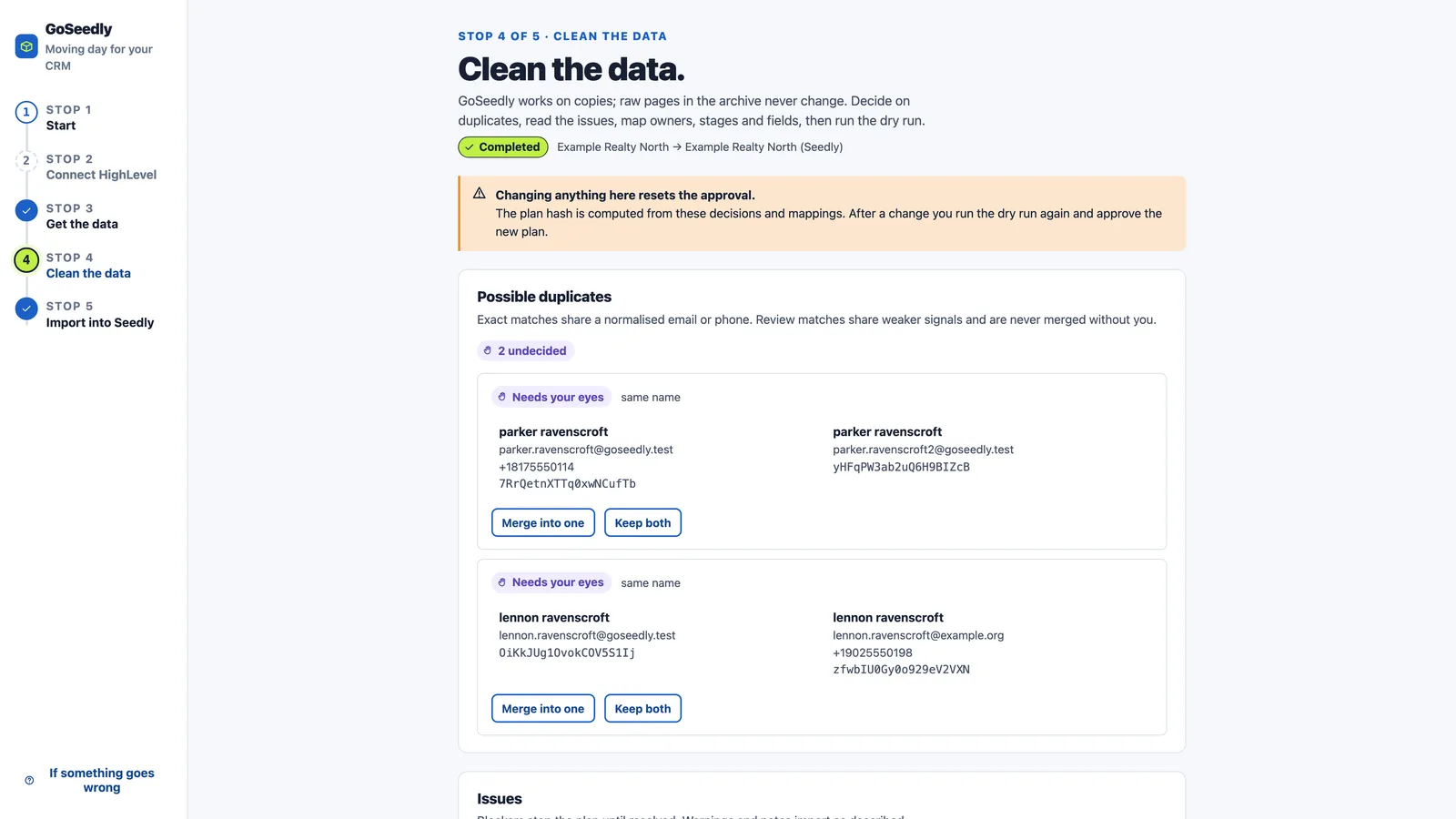
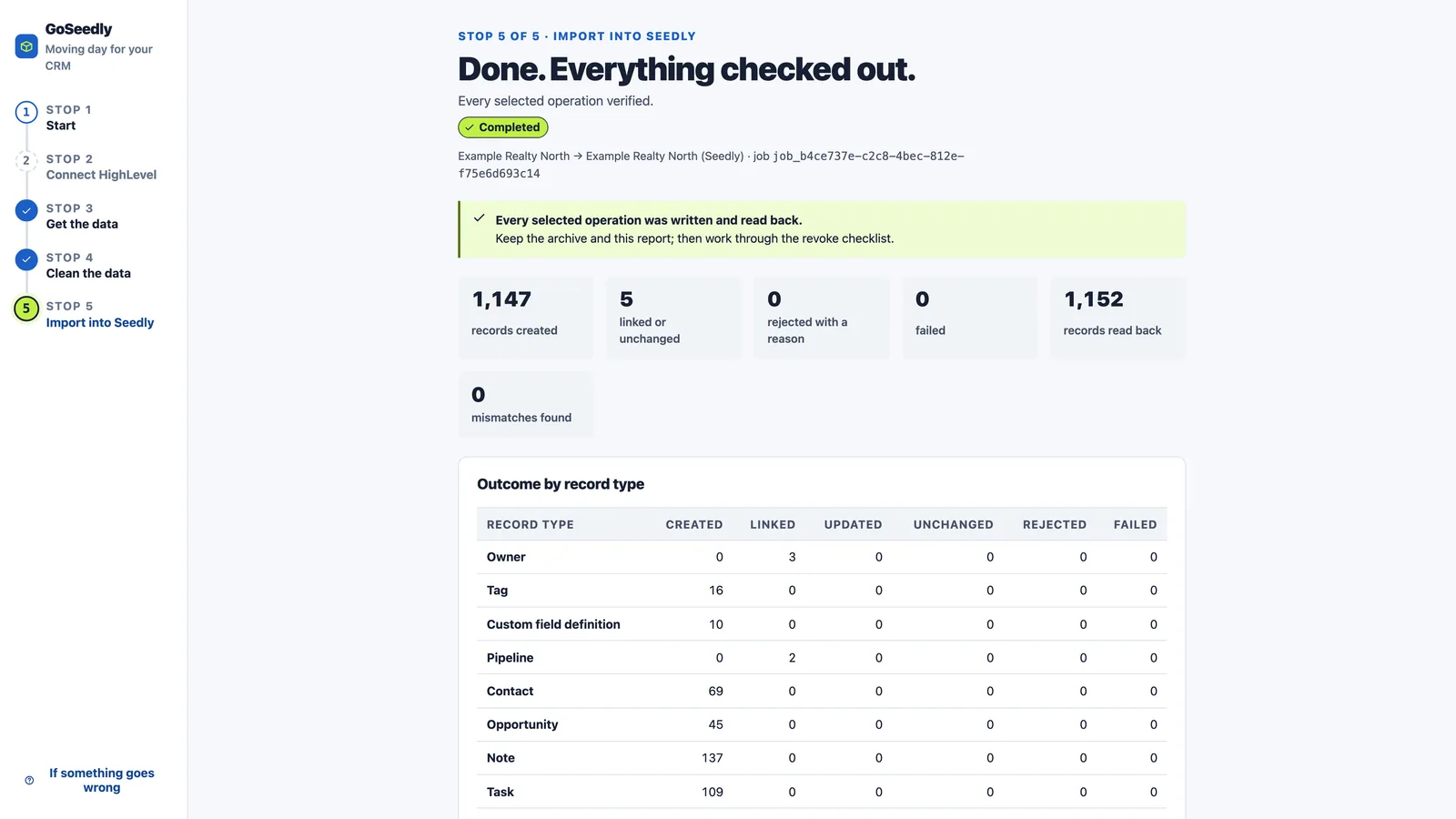
Actual Transfer Tool screens with sample data.
Broader HighLevel access gives you more to keep. The Seedly importer and your local archive have different coverage—here is the breakdown.

Choose Core CRM (12 permissions) or Everything readable (69 permissions: 68 reads plus OAuth token management). Then select your export categories and run Check access. Broader permissions expand possible reads—not native Seedly imports. CRM write/delete requests remain blocked on the HighLevel side.
These additional categories can be saved to your encrypted archive when selected, reachable, and returned by the API. They are not native Seedly imports. Lists may contain less detail than individual records, files, or a complete account backup.
Calendar and group lists, accessible schedule listings, and appointments returned on contact records.
Limit: No live bookings or reminders are recreated. The current job does not walk the full time-window calendar-event or blocked-slot endpoints.
Business lists, custom-object schema lists, association definitions, and location custom values.
Limit: Definitions are not a complete custom-object record or relationship export. Those per-object and per-record readers need further wiring.
Readable form and survey lists and submission records returned by their export endpoints.
Limit: Saved data, not working Seedly forms. The current generic reader does not set a submission start date, so provider defaults can limit the history returned.
Available invoice, estimate, schedule and template lists, plus order, transaction, subscription and coupon records.
Limit: Archive data only: no live billing, payment methods, active subscriptions, or provider credentials are moved into Seedly.
Readable product and collection lists, inventory, product reviews, store settings, and proposal/document and template listings.
Limit: No running storefront or signed-document file collection is recreated. Per-product prices and other ID-dependent detail endpoints are not automatically traversed.
Available funnel and redirect lists, blog site/author/category lists, trigger links, email-builder and schedule data, campaign lists, and workflow metadata.
Limit: Not full websites, blog posts, funnel pages, or executable workflows. Workflow steps and active enrollments are not recreated.
Available post lists, connected-account listings, categories, tags, CSV-import listings, and statistics responses.
Limit: Archiving a connected account does not transfer its authorization or restart publishing. Completeness depends on the endpoint response and pagination support.
Readable file listings and metadata, retained separately from supported message-attachment downloads.
Limit: This is a library inventory, not a download of every media binary. Standalone recordings and transcriptions need additional export implementation.
Available AI-agent and knowledge-base lists, voice-AI call logs, chat-widget listings, number pools, and affiliate records.
Limit: Best-effort reads only. Some endpoints lack a documented scope or need extra account access; a permission checkbox is not a guarantee of retrieval or complete AI configuration.
Missing permissions and unsupported endpoints can leave categories unavailable. Check the saved records, date coverage, skipped items, and errors—not just whether a permission was selected.
Know the difference when reviewing your results. Check skipped records and errors separately, too.
An archive only contains data successfully retrieved from the selected supported sources. It is not an exhaustive HighLevel backup. An accessible list does not prove that every detail record or file was downloaded.
Base importer ≠ the limit of your code. These are not built-in imports or complete export flows. You or your developer can add them where the APIs and destination allow, with your own implementation and testing.
Moving records does not move the systems that run your business.
Adjust field mappings, tag naming, cleanup rules, and duplicate handling to match how your business works.
Build additional data readers, record types, or destination adapters where source access and destination support make it possible.
Adapt the local review interface, add checks, or change your reports. You have the source to work on—not just a settings screen.
Custom development is not included. You are responsible for your changes, testing, security, and maintenance. APIs, account permissions, and third-party licenses still apply; some ideas may not be possible. Use the code for your business and authorized client migrations within the supplied license—not to redistribute or resell the kit.
You'll need your own accounts, backups, and someone comfortable running code.
Neither CRM license, hosting, API charges, nor other provider costs are included. Check the kit's operating-system and software requirements before you buy.
Review duplicates, map fields and owners, inspect a dry run, then approve the move. Check the report and actual Seedly records afterward.
Bring your own licensed Seedly installation and authorized HighLevel access. Hosting and third-party costs are separate. The video's length is not a migration-time promise. Custom development is your responsibility.
A downloadable source-code kit with a local review app, an independently authored Seedly import extension, written instructions, sample data, and a 10–15 minute tutorial. You install and run it yourself. It is not a SaaS login, Seedly license, done-for-you migration, or contracted support service.
Yes. You get editable source code, not a locked-down service. Change field mappings, cleanup rules, the review interface, or reports. You or your developer can also build extra data readers and destination adapters where the platforms allow it. Custom development, testing, security, and ongoing maintenance are your responsibility and are not included in the purchase. Source access does not bypass API limits, permissions, or third-party licenses.
Yes. Save multiple OAuth or Private Integration Token connections. Agency OAuth can discover authorized installed sub-accounts; select accounts and map each to a Seedly destination to create separate jobs. PIT uses one token per sub-account. Each job remains a one-way migration into a new/empty Seedly sub-account—not a populated-account merge, shared-account consolidation, or ongoing two-way sync.
The Core CRM preset requests 12 permissions. Everything readable requests 69: 68 reads plus OAuth token management. The broader preset lets the exporter attempt more archive categories; it does not add a Seedly import handler for every category. Select those categories when creating the job and run Check access. Actual results depend on the grant, account, endpoint, date range, and implemented reader. The preset excludes agency-only company, snapshot, and custom-menu permissions.
No. GoSeedly is an independent DevLaunch product, operated by Hypercat Studio LLC. We are not affiliated with, endorsed by, sponsored by, or otherwise connected to Seedly CRM or HighLevel. Their names identify the source and destination platforms, not a business relationship.
No. GoSeedly has a focused Seedly import flow and a broader local archive flow. Supported contact, deal, note, task, message, and attachment records can be imported; other readable categories stay in the archive. Some catalog entries still need additional export code, and some source data is unavailable. Check the release-specific compatibility guide and your actual job results. More permissions do not guarantee a complete backup or a full CRM clone.
No. Archived means a retrieved record or file is saved in your local export for reference. Imported means it has actually been written to Seedly. Some retrieved data may be archive-only; unavailable data is neither archived nor imported. Review those outcomes, skipped records, and errors before making your cutover.
Readable invoice and payment lists, calendar lists, and contact appointment references can be archived; they are not native Seedly imports. Supported call-message records do have an import mapping, but dedicated call recordings, transcriptions, full calendar-event traversal, and complete media-library downloads still need additional export wiring. A supported message attachment is a separate case. Editable source lets you build on this, but custom development and testing are your responsibility.
The import mappings cover SMS, email, Facebook Messenger, Instagram, live chat, and call records where the source provides compatible records. WhatsApp and Google Business Messages stay archive-only when retrieved. Group chat and review-request message types are excluded. This preserves history; it does not connect a live inbox, send a message, or transfer a phone number. Call records do not mean call audio is included.
The base importer does not recreate workflows, funnels, or running automation states. Plan to rebuild or separately implement them. Phone porting, DNS, payment credentials, and provider authorizations need separate setup with the relevant providers. Editable code is useful, but it cannot replace those external processes. GoSeedly is not a full business-system clone.
You don't need to write the migration engine to use the base kit, but you do need to follow a technical setup guide, run code locally, configure credentials, and install a compatible Seedly extension. Changing the engine or adding new integrations requires development skills. Bring a technical operator if that isn't your thing. This is not a managed migration or done-for-you service.
Yes, plus authorized access to your HighLevel account. Neither CRM, its hosting, nor third-party service charges are included. You are responsible for your accounts, platform permissions, licensed software, and any API, storage, or infrastructure charges.
You run the migration code on your computer and connect to the CRM systems you authorize. This is not a DevLaunch-hosted migration service. Don't send us passwords, tokens, customer lists, recordings, or unredacted exports for support. Review any code you customize and the providers it connects to. The sales website separately processes technical data and optional analytics; see the GoSeedly Privacy Policy.
Ordinary CRM write endpoints can have side effects. Use the dedicated historical-import extension on a supported version, not live send or booking endpoints. Test in an isolated account before importing real data. Customizations can introduce new side effects, so you are responsible for reviewing and testing any changes, including messaging, booking notifications, and automation behavior.
You control and approve the migration. Keep independent source and destination backups, test in an isolated account, review mappings and opt-outs, and verify the report and real records before making a cutover. Never cancel HighLevel or delete source data just because an import has finished. No tool can guarantee recovery of data the source no longer provides.
Keep your archive and migration logs, then follow the supplied recovery instructions before retrying. Review what was already imported so you do not create duplicates. Platform changes may require changes to your copy of the code. No lifetime compatibility, uptime, maintenance, or future updates are promised. This is a code product you operate and maintain, not an ongoing service.
The instructional video is 10–15 minutes. Actual setup, cleanup, exporting, importing, and verification may take substantially longer, depending on account size, files, API limits, and the condition of your records.
Do not assume the kit is certified for regulated workloads or that buying it supplies a data-processing agreement or business associate agreement. You must establish the permissions, agreements, safeguards, and lawful basis your data requires before use. For client work, obtain the client's authorization.
No. You download and run the code yourself. There is no included installation, technical support, custom development, migration service, response-time promise, or guaranteed fix. We may offer discretionary general guidance in our Facebook group and by email, but that is not a contracted support service. Never share credentials or unredacted customer data when asking a question.
All sales are final. We do not offer voluntary refunds, returns, or exchanges for this digital code product. Please review compatibility and technical requirements before buying. This does not exclude a refund or other remedy that applicable law requires.
The license is for running and modifying the code for your business and authorized client migrations—not redistributing, publishing, sublicensing, or reselling the kit. Editable source does not mean an unrestricted open-source license. Buying the code does not transfer its copyright or include Seedly's license. Review the supplied license before purchase.

Customer experiences / Trustpilot
Selected excerpts from reviews of DevLaunch training, software, and services. Individual customer experiences across DevLaunch.
We use essential storage to keep the site working. With your permission, we also use analytics and the Whop Pixel to understand visits and advertising results. Optional analytics stay off until you choose.
Read our Cookie Policy and Privacy Policy.