Inbox
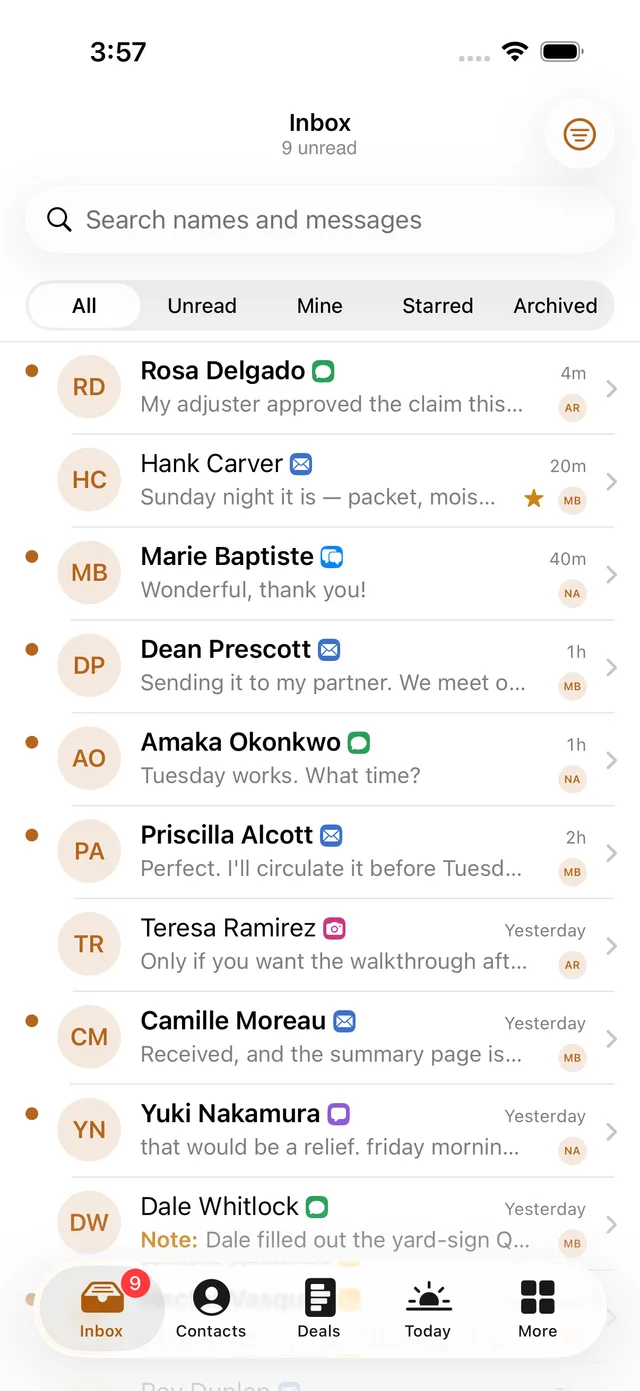
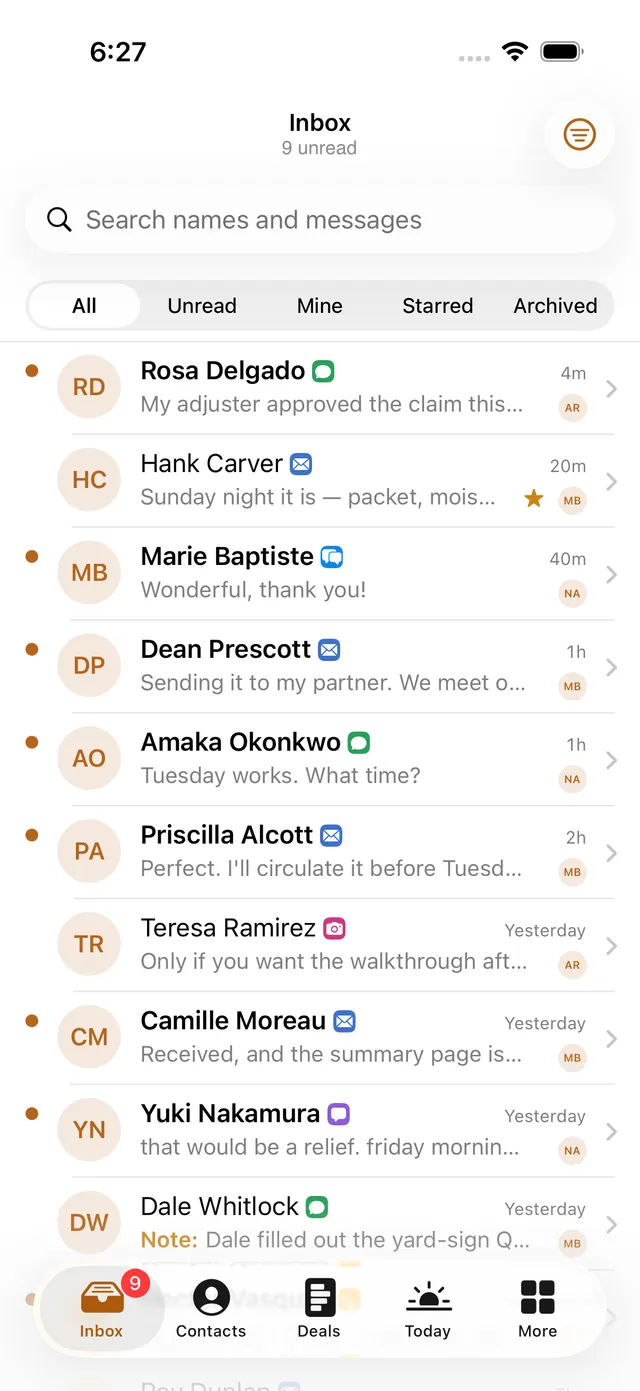
An inbox with unread, assigned, starred, and archived views. Open a thread, see its context, and work from a native conversation screen.
MOBILE APP PACK
Native iOS + Android source code for your Seedly CRM, including 71 built iOS screens and sheets. Bring your whole workday to an app with your own branding.

Tap through the real iPhone and Android app screens.
Tap the phone’s tabs and records, or pick a screen.
Conversations and context, together.
Interactive walkthrough of actual iOS and Android app screens with sample data.
Inbox, Contacts, Deals, and Today anchor the app. Twelve more CRM tools are a tap away.
An inbox with unread, assigned, starred, and archived views. Open a thread, see its context, and work from a native conversation screen.
Search contacts, open profiles and timelines, review notes, and edit supported details without working through a desktop layout.
Browse pipeline stages, see deal values, open the history, and work with supported deal actions from your phone.
Tasks, appointments, and a daily timeline in one place, with task details, rescheduling, and completion flows in the iOS codebase.
Calendar, invoices, documents, and form submissions.
Reviews, campaigns, social posts, and QR codes.
Calls, reports, smart lists, and workflow information.
When your CRM runs the Seedly Dispatch add-on: a technician's day with drive times, status taps, checklists, photos and collect-at-finish, plus a dispatcher board with a live map, on Apple Maps and Google Maps. Not installed? The tool says so and everything else is unchanged.
Additional iOS screens surface CRM information and supported actions. Workflow and form building stays on the web. Live availability depends on your CRM version, permissions, and connected services.
Set the app name, icon, colors, typography, and onboarding copy. The iOS theme can also adopt a location's brand color.
Choose the tools that show up and which areas sit in the tab bar. Adapt the feature screens and flows in source.
Work with the app shell, shared design system, feature modules, and CRM contract to extend your own app.
You or your developer handle setup, testing, and distribution.
Read the launch guideRun the sample workspace and get familiar with the screens before connecting a real CRM.
Configure your app name, icon, theme, and deployment details.
Connect a compatible Seedly installation and verify sign-in, data, permissions, and actions.
Use your own signing credentials and developer accounts for device testing and distribution.
The iOS project targets iOS 26 and uses Swift/SwiftUI, Xcode 26, and XcodeGen. The Android project uses Kotlin and Gradle. You need your own licensed, deployed Seedly CRM and a technical operator comfortable building native apps.
The iOS and Android projects both build and run on sample data. Live CRM compatibility has not yet been verified against a real deployment. Screenshots show sample data. Push notifications and in-app calling are built but need a relay and an add-on you host; full offline editing is not included; store distribution is scripted but not exercised against real developer accounts. Check the release documentation, starting with the launch guide.
Store accounts, publishing, and hosting are separate. Technical setup, custom development, security, testing, and ongoing maintenance are your responsibility.
A separate GoSeedly source-code product for native mobile companion apps that connect to your own Seedly CRM. The intended pack includes iOS and Android projects. It is not the underlying Seedly CRM codebase, a CRM license, or a hosted app subscription.
No. You can use the mobile pack with an existing compatible Seedly installation whether or not you came from HighLevel. The Transfer Tool is for moving supported HighLevel records; the mobile pack is for your day-to-day mobile CRM experience.
The iOS app is built in Swift and SwiftUI, with native screens and navigation. The Android project uses Kotlin and a native app structure. The pack is intended for native mobile builds, rather than a web dashboard displayed inside an app wrapper.
Yes. Customize the app name, icon, colors, typography, corners, onboarding copy, and feature screens. The iOS code includes theme configuration, location brand colors, appearance choices, and tool visibility settings. You can adapt the source to your needs. Custom development is not included; your changes, testing, security, and maintenance are your responsibility.
The iOS app has 71 built screens and sheets in total: 16 CRM work areas, plus onboarding and settings. The count includes main screens, record details, editors, and action sheets, with light and dark appearances counted once. You also get the app shell, a shared design system, CRM connection code, authentication and session handling, a mock backend, and a fictional sample workspace. Android implementation is still being completed; live CRM compatibility and release readiness need verification before delivery.
The screenshots show the iOS app with sample data. The code contains a CRM connector and a documented backend contract, but a screenshot does not verify a live integration. Available actions depend on your Seedly version, permissions, and configured providers. Test the connection and each workflow against your own compatible deployment.
The code for both is in the pack, and both need pieces you host: push notifications use a small relay you deploy on your own Cloudflare account plus a Seedly add-on installed through Seedly's extension mechanism, and in-app calling uses your location's existing Seedly dialer with your own Twilio push credentials for calls that ring a closed phone. Without those pieces the app says so on screen and falls back to the phone's dialer. Full offline editing and some sign-in options still require further work, and none of this has been verified against a live CRM deployment yet. Confirm the release-specific feature list before purchase.
Yes, from version 1.5. If your CRM has the Seedly Dispatch add-on installed, both apps show the field-service screens: My Day with drive legs and carried-over work, status taps that are sent immediately rather than queued, running late, couldn't finish, notes, checklists, photos with an offline queue, equipment pickup, collect at finish, time off, location consent that reports only between On my way and Arrived, and a dispatcher board with assign, move, a live map and new jobs with suggested slots. Maps are the platform's own: Apple Maps on iPhone, Google Maps on Android with your own key. Dispatch itself is Seedly's add-on and is not included; the app detects it and shows an honest not-available state without it. Verified by reading the add-on's source, not yet against a live install.
Configure the project for your business, connect your CRM, test the build, then handle signing and distribution with your own Apple and Google developer accounts. App-store listings, approvals, developer fees, hosting, and any provider charges are separate. Buying code does not guarantee store approval.
Editable source does not mean an unrestricted open-source license or automatic resale rights. Review the Mobile App Pack's supplied license before purchase. Your Seedly license and third-party licenses remain separate, and the pack does not give you rights to redistribute their code.
You or your developer configure, build, test, and maintain the apps. No installation or contracted technical support is included. General group/email guidance may be offered at our discretion; it is not a response-time or guaranteed-fix commitment.
All sales final. No voluntary refunds, returns, or exchanges for this digital code product, except where a refund or other remedy is required by law. Review compatibility, the supplied license, technical requirements, and current release status before buying.
Customer experiences / Trustpilot
Selected excerpts from reviews of DevLaunch training, software, and services. Individual customer experiences across DevLaunch.
We use essential storage to keep the site working. With your permission, we also use analytics and the Whop Pixel to understand visits and advertising results. Optional analytics stay off until you choose.
Read our Cookie Policy and Privacy Policy.