Every space, every date. Every hold on your terms.
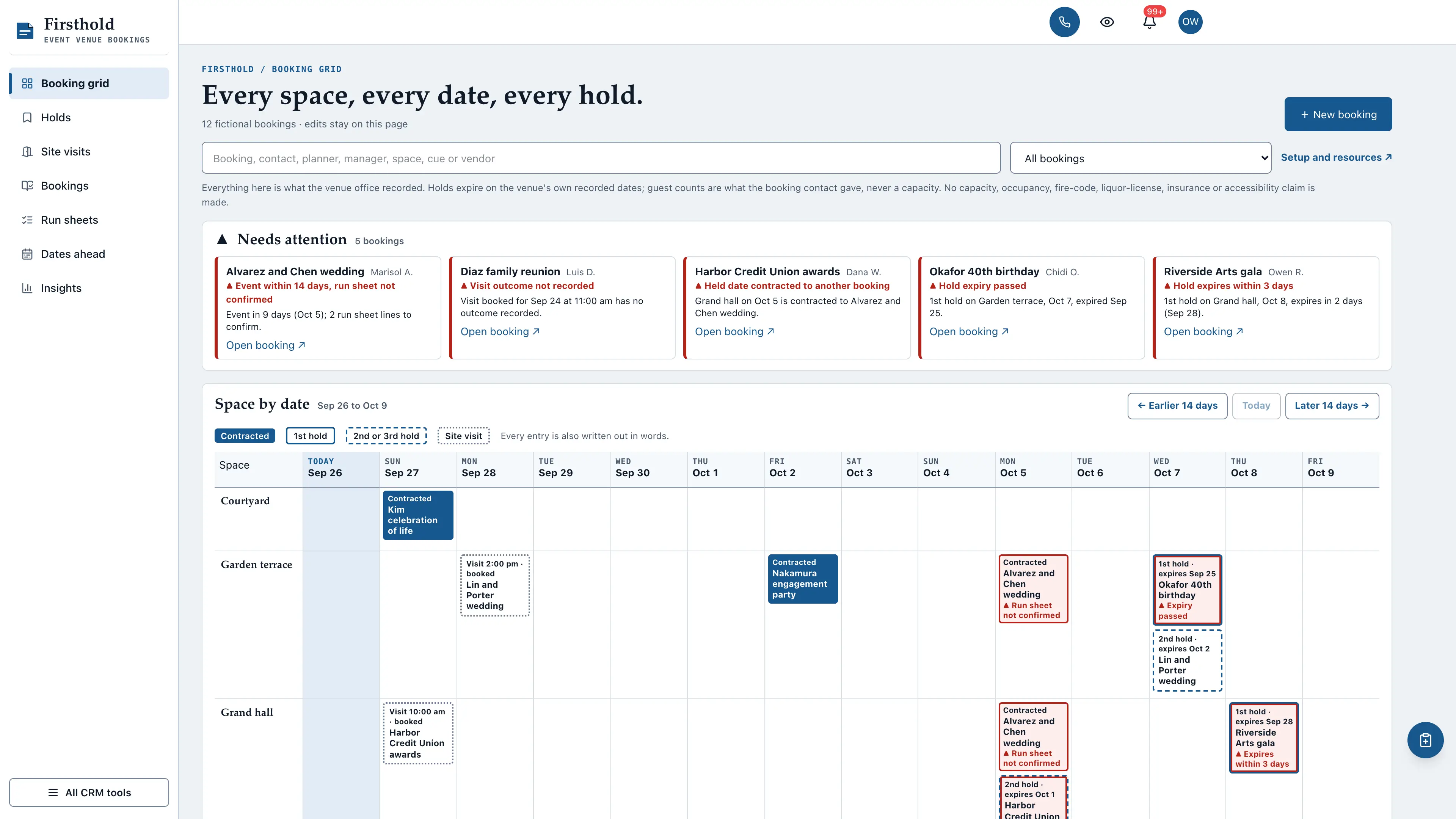
A booking grid for event venues: every space down the side, the next fourteen dates across the top, and in each cell the contracted date, the first and second holds with the expiry dates your venue set, and the site visits booked. Firsthold keeps holds, site visits, bookings, event-day run sheets and the next 90 days by space in one connected workspace, and it never turns a guest count into a capacity.
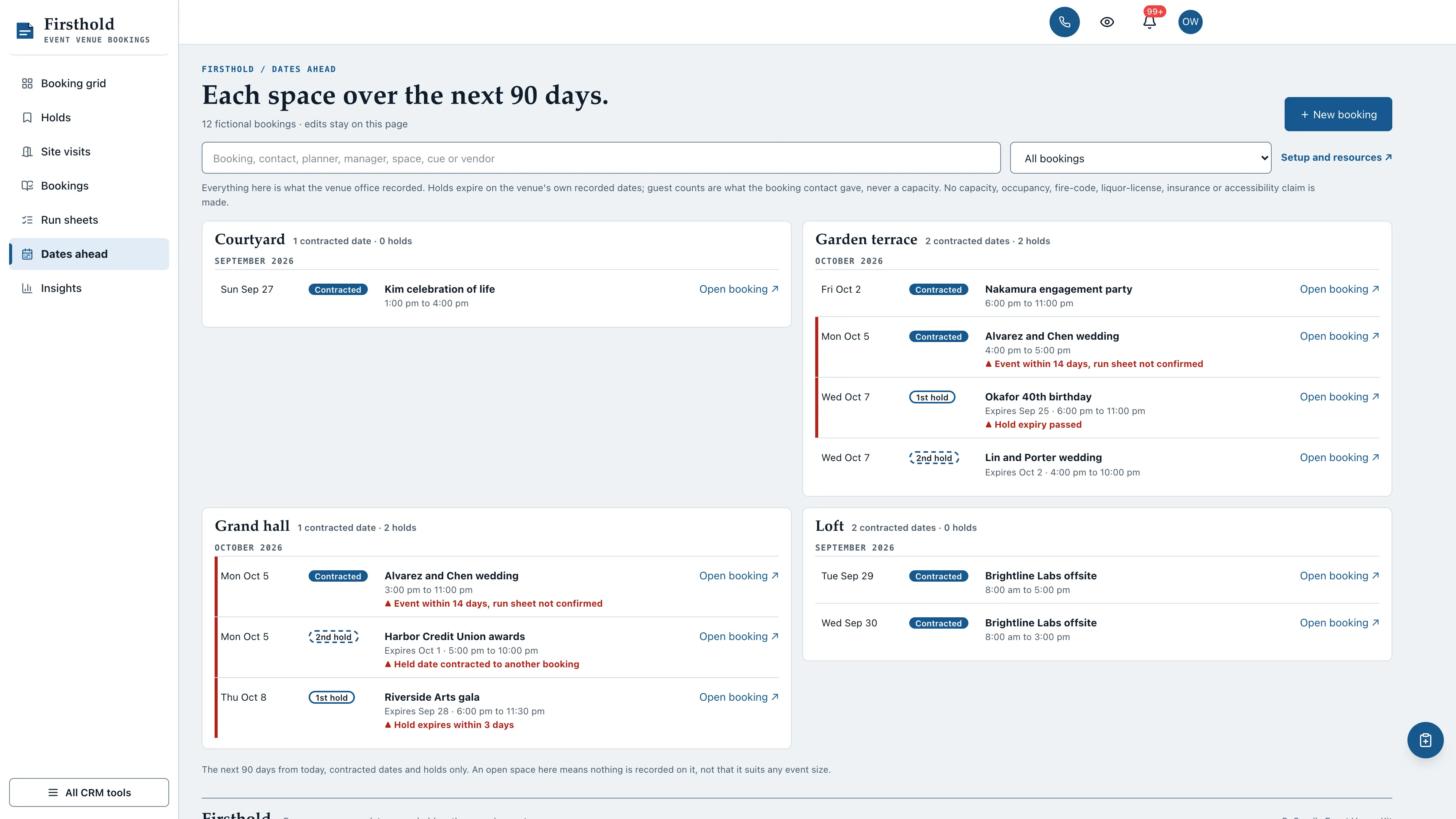
A needs-attention strip, then fourteen dates of spaces: contracted dates as solid blocks, first holds outlined, second holds dashed and site visits dotted, each written out in words. Holds past or near the venue's expiry, holds on a date another booking contracted, run sheets still open in the last two weeks and visits with no outcome lead.
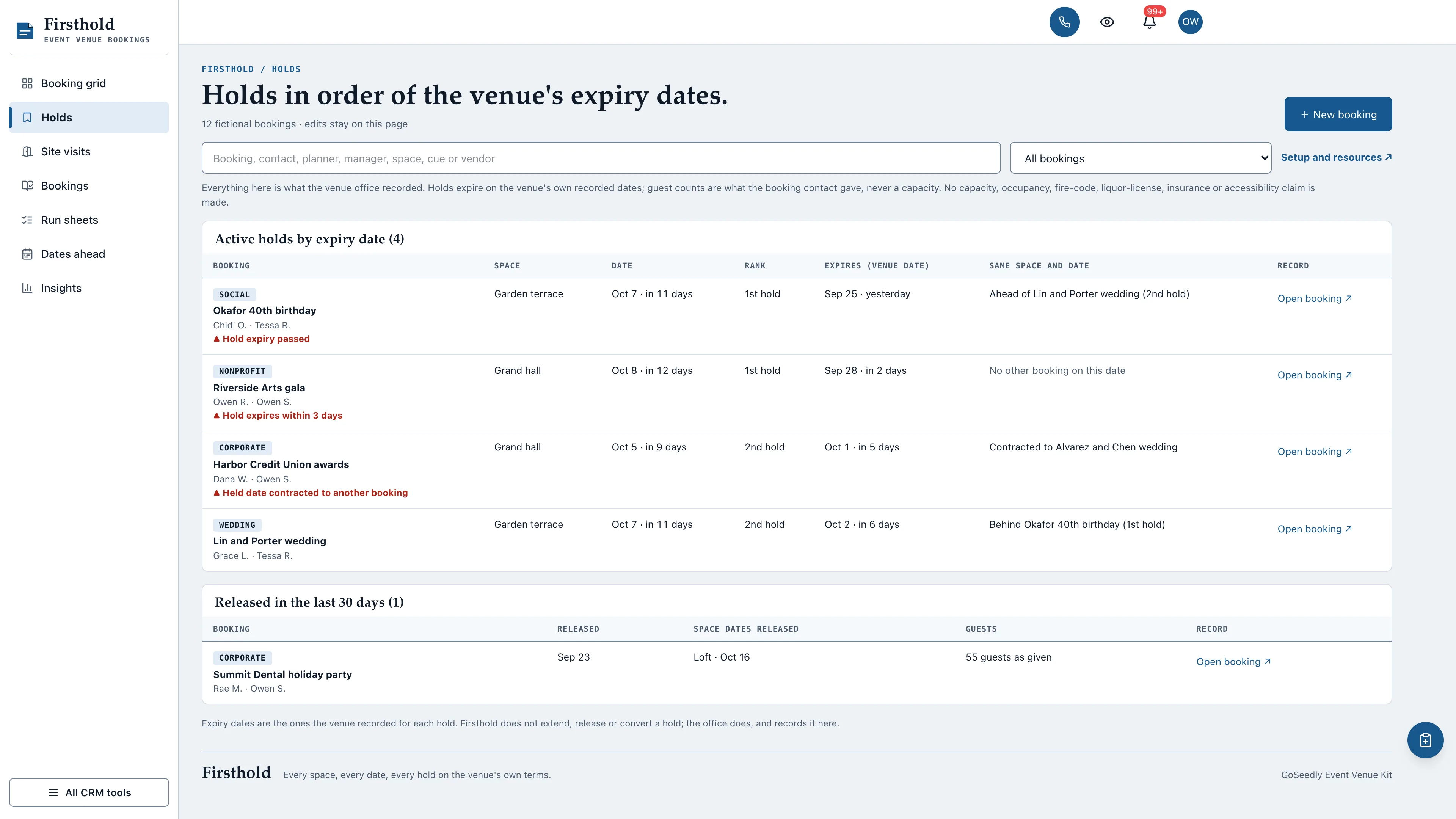
Active holds sorted by the expiry date the venue recorded, with the space, date and rank, and who else is on that space and date: ahead of a second hold, behind a first hold or already contracted to another booking.
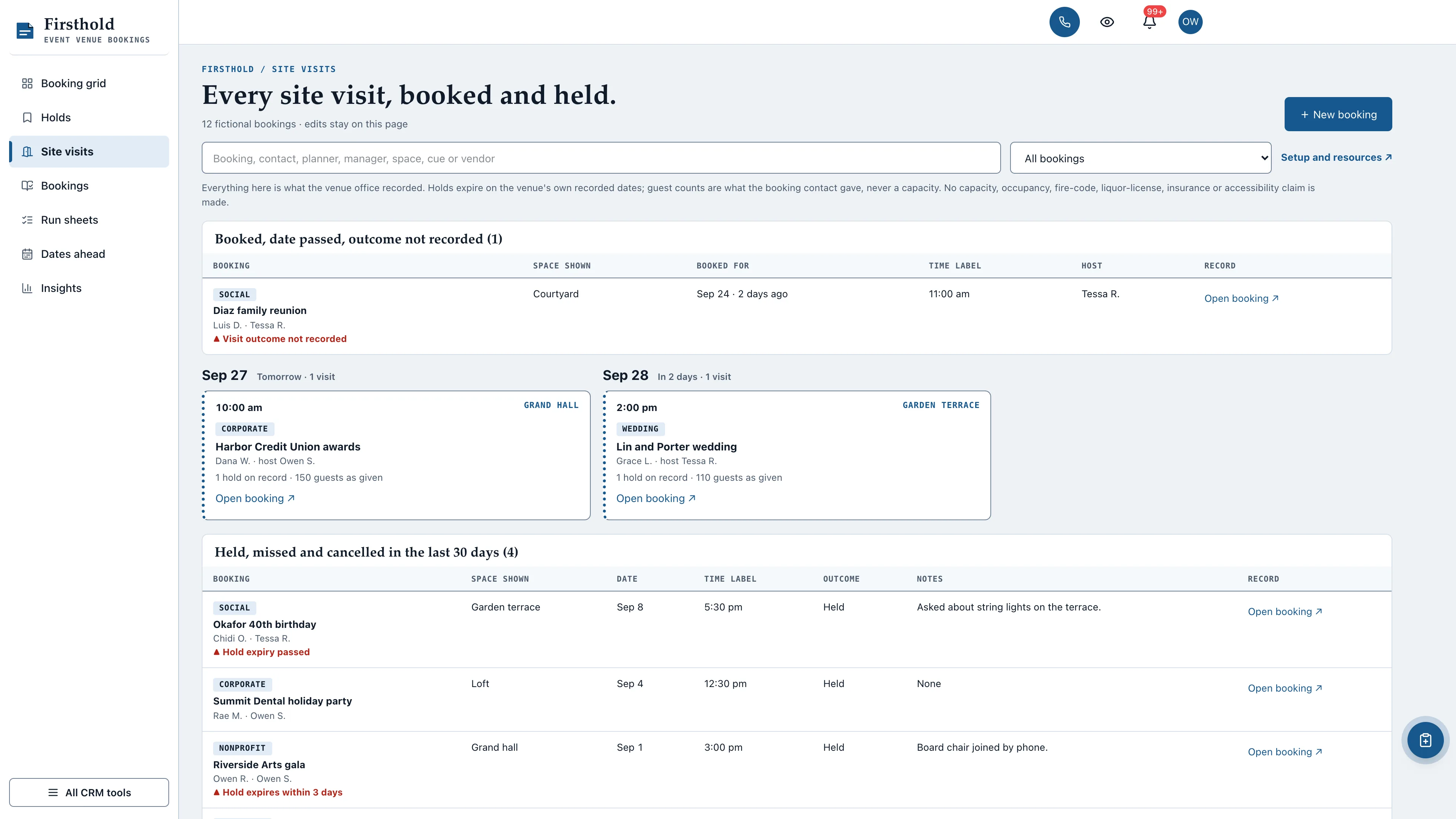
Booked visits whose day passed with no outcome first, then booked visits by day with the time label and space shown, then visits held, missed or cancelled in the last 30 days.
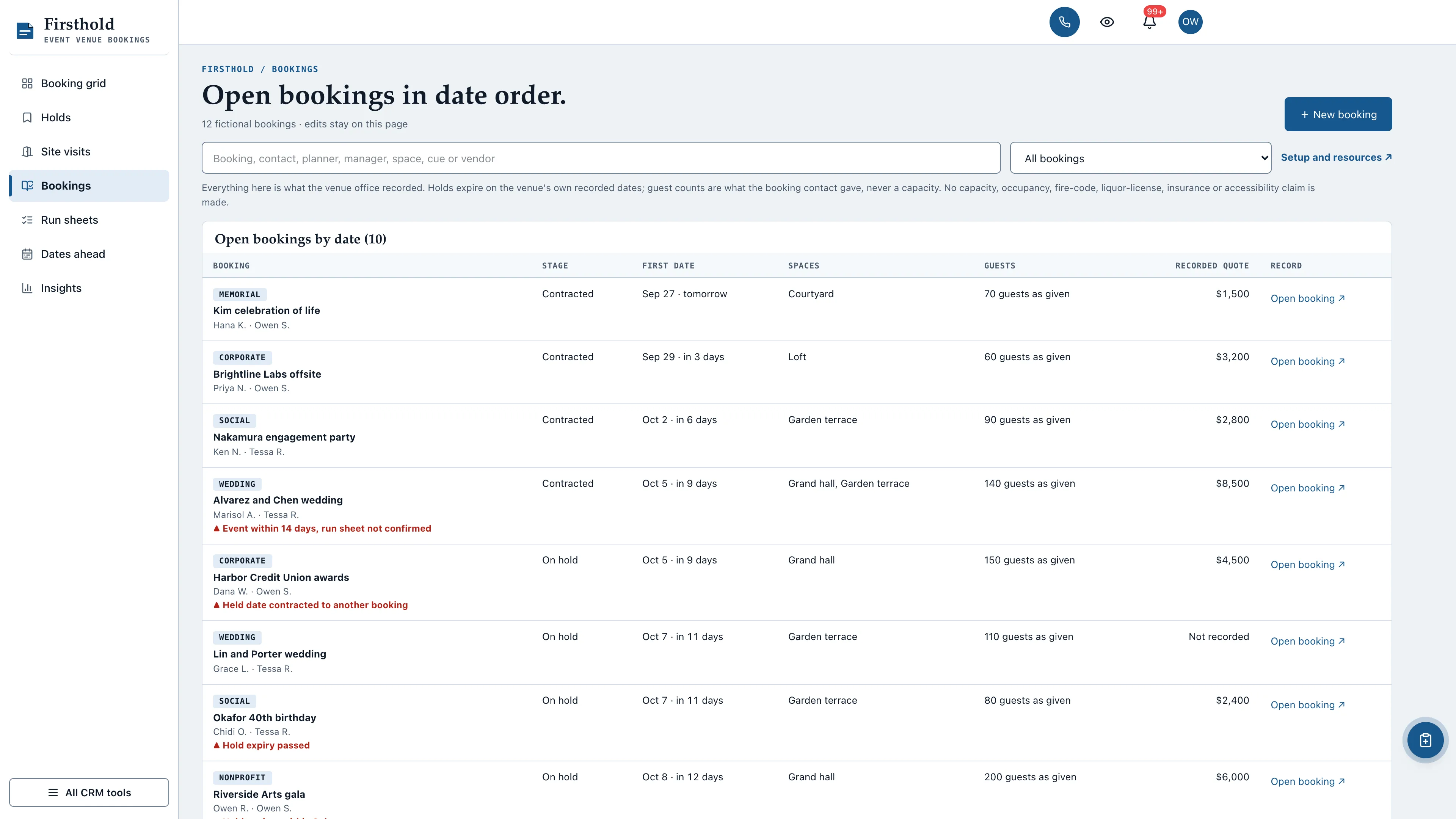
Open bookings with their stage, first date, spaces, guests as the contact gave them and the recorded quote in their own columns, then bookings closed out, released or cancelled in the last 30 days.
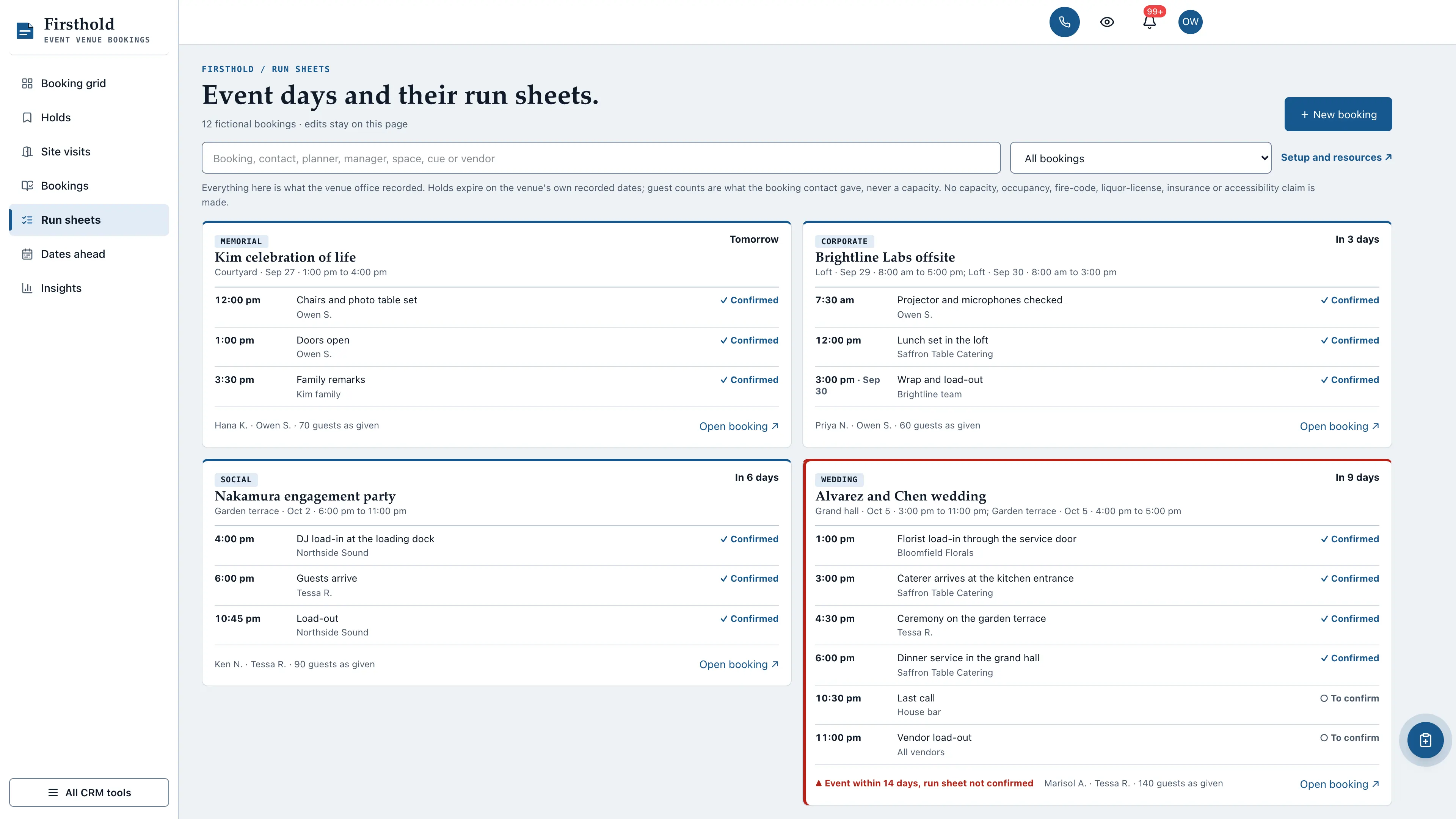
Contracted bookings in the next 30 days, soonest first, each with its run sheet in time order: load-in, doors, ceremony, dinner, last call and load-out, with the owner and a to confirm, confirmed or done word on every line.
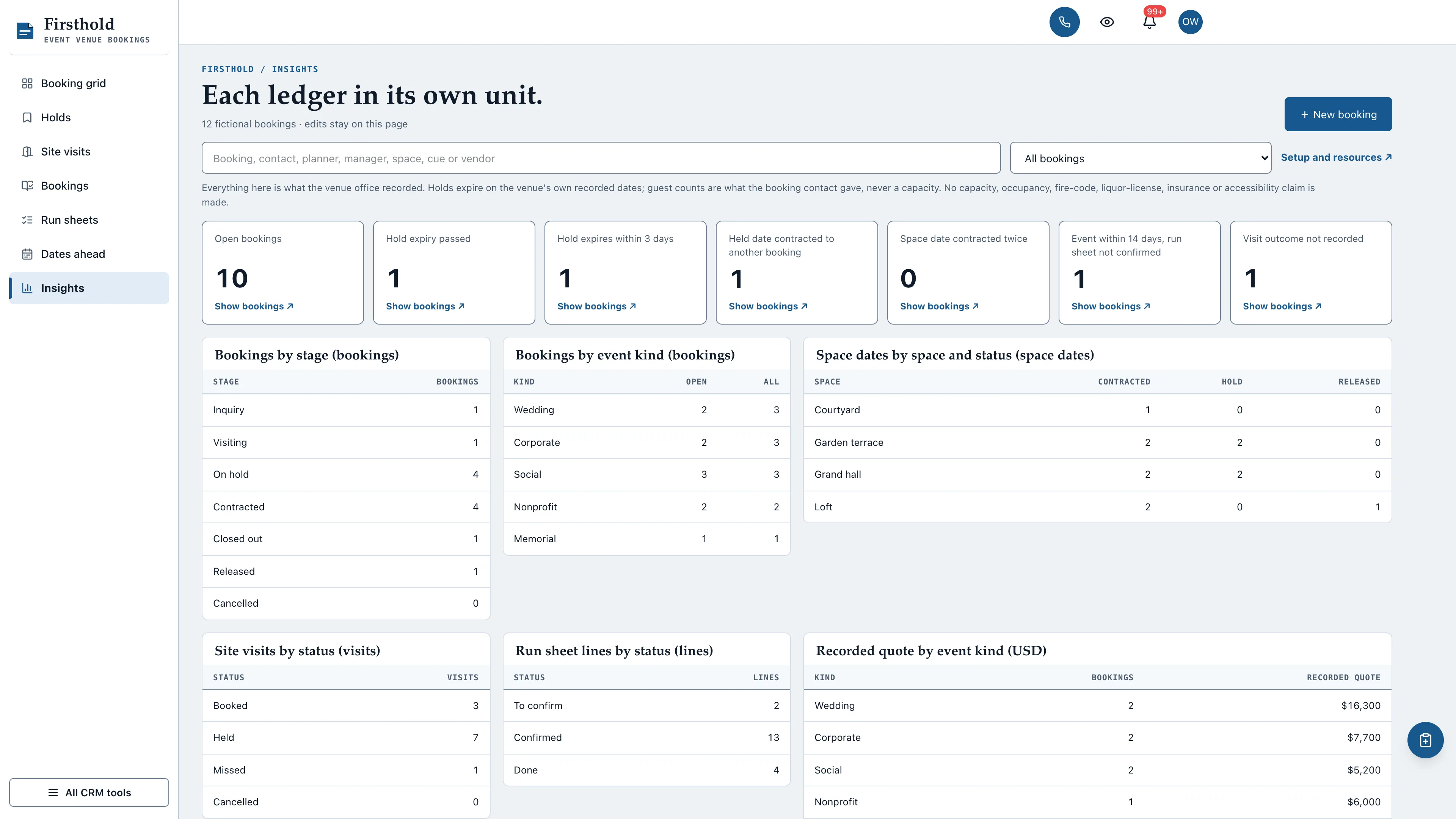
Bookings by stage and event kind, space dates by space and status, site visits and run sheet lines by status, and recorded quotes by event kind. Days, guests, hours and dollars are never added together or drawn on one scale.
YOUR PROCESS, YOUR STARTING POINT
Useful structure. Only what you choose.
4 pipelines and 9 workflow drafts. Add the parts that match your work, with a separate sample view for exploring the interface.
01 / FOUR PIPELINES
Choose your starting structure.
Use a ready-made stage sequence or connect drafts to a suitable existing pipeline.
Venue bookings · 8 stages
Wedding bookings · 8 stages
Corporate and group events · 7 stages
Holds and date requests · 6 stages
02 / NINE WORKFLOW DRAFTS
Give the next step a shape.
Site visit preparation
Site visit follow-up
Hold expiry review
Contract check
Event week run sheet
Close-out
Final walkthrough
Space options follow-up
Hold release note
Native trigger, task, wait, and note nodes provide editable examples. Every draft stays inactive until you review and publish it.
03 / SAMPLE WORKSPACE
Explore before adding records.
Explore 12 fictional bookings across four spaces: ten open (one inquiry, one visiting, four on hold and four contracted), one closed out and one released, with 12 space dates, 11 site visits, 19 run sheet lines and 84 checklist steps. Sample edits stay in memory and reset on navigation or reload.
No sample customers are inserted into your CRM.
Starter setup checks selected kit additions before removal and preserves edited records and live work.
MORE OF THE WORKING DAY
From the first inquiry to the final handoff.
Editable native forms and document templates give your team a practical starting point.
01 / INTAKE & FOLLOW-UP
Three ready-to-edit forms.
Event inquiry
Site visit request
Vendor arrival details
Choose forms individually in Setup & resources, then customize and publish them in the native form builder.
02 / WORKING DOCUMENTS
Three reusable templates.
Hold confirmation
Event-day run sheet
Site visit notes
Open each template in Documents and complete it for the actual job or visit.
03 / THE NEXT STEP
Checklists alongside the work.
Record progress and notes in the kit’s operating views. Keep earlier rows by archiving them, and retain the context for the next person.
Forms collect information for staff review. They do not automatically change the kit’s custom records. Repeating setup preserves existing resource edits.
THE KIT, UNPACKED
Your workspace. Your starting point. Your code to edit.
One contact-linked booking holds the event kind, the planner and event manager, guests as the contact gave them, the inquiry, contract and close-out dates and the recorded quote, plus every space date with its hold rank and the venue's own expiry date, every site visit with its outcome, every run sheet cue with its owner, and an editable checklist.
Booking grid operating view
Holds operating view
Site visits operating view
Bookings operating view
Run sheets operating view
Dates ahead operating view
Insights operating view
Three native form drafts and three editable document templates
Editable booking checklists and preserved row history
Four optional pipeline templates and nine inactive workflow drafts
12 fictional in-memory bookings
Guided setup, compatibility report, and private rollback receipt
AI-agent documentation for customized installations
Original editable source, configuration, and tests
Run the guided setup from the extracted kit. Supported integrations can be installed directly; customized integration files get a reviewed merge.
02
Connect the required helper.
Deploy the included helper from your authoritative backend source before connected edits. Build your web app, then choose any optional pipelines and drafts you need.
03
Set up your own team.
Edit business name, descriptor and default pipeline name. Sign in with your account and verify the workflows and permissions your team uses.
Compatibility and operational details
Seedly CRM 5.8.4 · extension API 1. Node.js 20 or newer. The installer checks supported integration-file versions and does not deploy your web app or backend. The included original backend helpers are required for connected booking creation, edits and resource setup. They preserve native account permissions, unrelated custom fields and row history, keep every run sheet cue exactly as typed, refuse access codes, Wi-Fi passwords, logins, card numbers and Social Security numbers, and check revisions before saving. Deploy them from the authoritative backend source. Pipelines and workflow drafts are optional.
Firsthold records what the venue held, contracted, showed and ran. Hold expiry dates are the ones your venue sets; Firsthold never sets or extends them. Guest counts are what the booking contact gave and are never totalled or compared with a space. It keeps no capacity, occupancy, fire-code, liquor-license, insurance or accessibility field and makes no such claim. It books no calendars, sends no reminders or messages, takes no deposits or payments and collects no signatures. Load-in, dock, gate, door and alarm codes, Wi-Fi and app passwords, payment card numbers and Social Security numbers are refused in recorded text and in the native form drafts.
Calling, messaging, signing, payments, and external integrations depend on your Seedly installation, account permissions, plan, and configured providers. Screenshots use sample data and reference imagery. Hosting, installation, and ongoing maintenance are your responsibility.
Checking access…
DEVLAUNCH ALL ACCESS
Every kit. And everything else.
DevLaunch All Access includes every GoSeedly CRM kit, all 195 available today, along with every class, course, and product we release, and private calls with Aaron.
All 195 CRM kits
Every published kit as original editable source, with optional pipelines, workflow drafts, and guided installers. Browse the kits
Every class, course, and product
The full DevLaunch library and software collection, plus each eligible release during your access year, added to your portal as it ships.
Private calls with Aaron
Bring the idea, the offer, or the bottleneck, and leave with a plan you can follow.
DevLaunch All Access
Want more than one kit? All Access covers the whole CRM kit library and the rest of what we make. See everything it includes on the All Access page.
For your own compatible Seedly CRM. Seedly software, hosting and installation services are separate. Each full-interface kit uses its own web installation.
BEFORE YOU MAKE IT YOURS
Good questions. Clear answers.
How do I receive the kit?+
Purchase securely through Whop. Your original source ZIP and installation documentation are delivered manually to the email used at checkout. This is a one-time purchase of this kit; Seedly software, hosting, and installation services are separate.
Does this include Seedly CRM?+
You obtain and configure Seedly separately. The kit adds original frontend screens, a shared theme, starter definitions, and integration instructions. It does not include Seedly’s codebase, license, hosting, or a separate CRM database.
Is this one connected workspace?+
Firsthold keeps its light side rail across the kit views and native CRM tools in the same signed-in account. Contacts, Calendar, Estimates, Documents, and other full modules retain the functionality supplied by your own Seedly installation. Existing authored content and provider screens retain their own layouts.
Can I use it with existing customizations?+
Yes, with a compatibility review. The installer checks the supported integration files. Changed integration files need a reviewed merge; the included AI-agent guide explains how to preserve custom extensions, permissions, providers, and routes.
Do I have to import all the starter content?+
No. Choose individual pipelines and workflow drafts, use a compatible existing pipeline, or install none. Workflows remain inactive until reviewed and published. They use native triggers, internal tasks, optional notes, and timed waits. A wait does not verify task completion or recheck the current stage. The included drafts do not send customer messages.
Can I remove the examples and starter content?+
Sample records stay in memory and never create customers in your CRM. Leave sample mode to return to your account. Starter setup lets you review removal of unused kit additions; server checks retain edited or published workflows and pipelines with live work or references. Removing the frontend does not delete account records.
Can different subaccounts use different kits?+
The current design and branding apply to the whole web installation. Subaccounts still separate data and access. Use a separate web installation for another full-interface kit; running different kit designs by subaccount in one installation requires additional customization.
Selected excerpts from reviews of DevLaunch training, software, and services. Individual customer experiences across DevLaunch.
Your privacy, your choice.
We use essential storage to keep the site working. With your permission, we also use analytics and the Whop Pixel to understand visits and advertising results. Optional analytics stay off until you choose.
 01 / Booking grid