
Choose the right visual
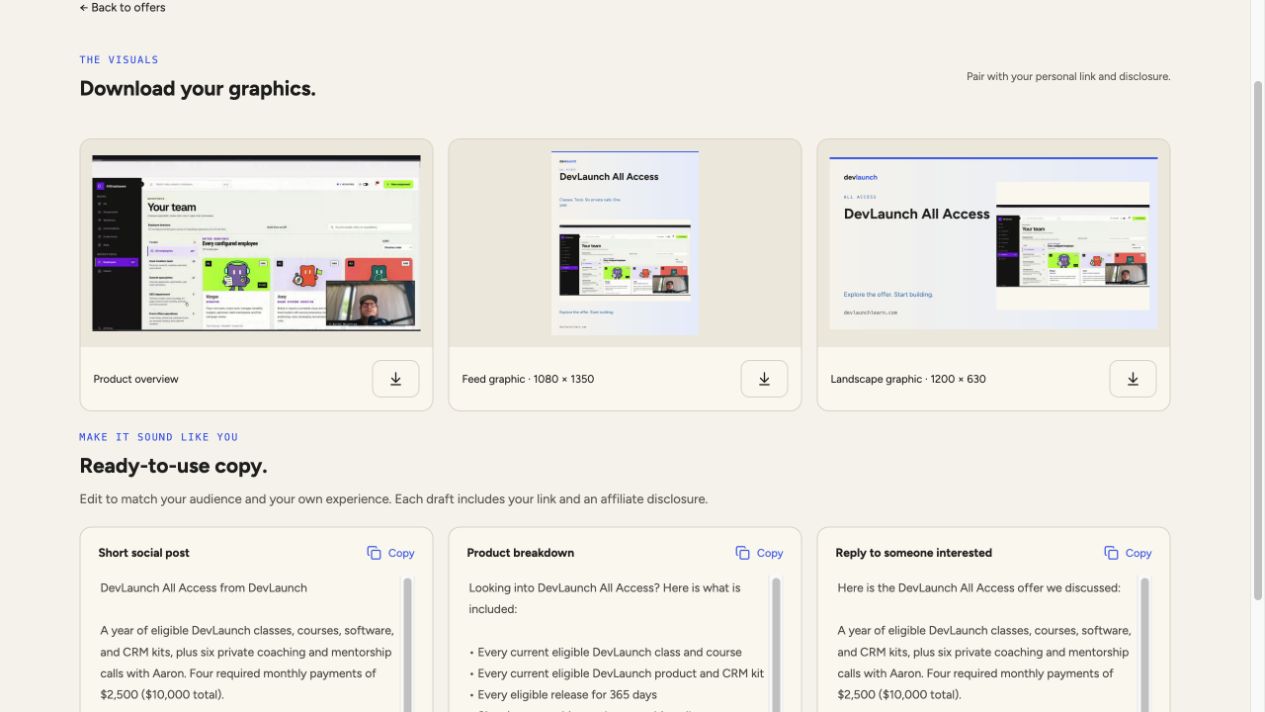
- Open the product’s campaign kit and scroll to Download your graphics.
- Use the Product overview to show the product itself. Featured kits also include a portrait feed graphic and a landscape graphic.
- Select the download icon beneath the image you want. The label shows its format and dimensions; the feed artwork is 1080 × 1350 and landscape artwork is 1200 × 630 where available.
- Check how the visual is cropped in the publishing platform before posting. Keep the product name and main message readable on a phone.
Not every offer has every graphic format. Use the assets available in that offer’s kit, and pair the visual with your own tracked link.
Turn a template into your recommendation
Each offer includes a short social post, a product breakdown, and a reply for someone interested. Select Copy, then edit the text in the place you are preparing your campaign. The dashboard templates are starting points, not a claim that you have used the product.
- Open with a problem your audience recognizes.
- Describe one specific benefit and what the buyer receives. Use the product page for facts and requirements.
- Add your experience only if it is true. Avoid invented testimonials, income figures, guarantees, or deadlines.
- Use one clear next step with your personal link and keep the affiliate disclosure visible.
A simple campaign outline
Post 1: explain a problem and show the relevant product workflow. Post 2: answer a real question about setup, what is included, or who the product fits. Post 3: share a practical example and invite interested readers to review the offer.
You can adapt this outline for a short video, a newsletter, or a community post. Follow the rules of the community or platform where you publish. Tailor replies to the person’s question rather than pasting an unrelated sales pitch.
Use the brand assets
- In Guides & resources, find Brand essentials. Download the DevLaunch wordmark and Figtree font, along with its license.
- Keep the wordmark proportions intact. Use cobalt #2463eb, ocean #1769aa, cream #f7f4ed, and charcoal #20201d text.
- Make it clear that you are an affiliate. Do not present your page as the official DevLaunch website or promise support or product features that are not included.
Before you share a screenshot
Remove email addresses, account names, customer information, personal referral links, balances, earnings, payment details, and login codes. Crop the screenshot to the useful controls, or use an opaque redaction on anything that must remain in frame. Export a flattened image and review the actual exported file at full size.
These guides use the real workspace with demonstration data. Private account details and earnings are omitted, and example links use a sample affiliate tag.