
1. Start with one audience and one problem
Choose a product you understand and an audience it can help. For example: a builder looking for an app codebase, an agency researching CRM templates, or someone learning an AI workflow. Read the full product page before making recommendations.
- Write down who the offer is for, what they get, and what they need to set it up.
- Separate a source-code package from a hosted service. Mention installation, software, and other requirements shown on the product page.
- Choose a useful angle: a short walkthrough, a specific feature, or an honest comparison of the buyer’s options.
2. Find the right offer
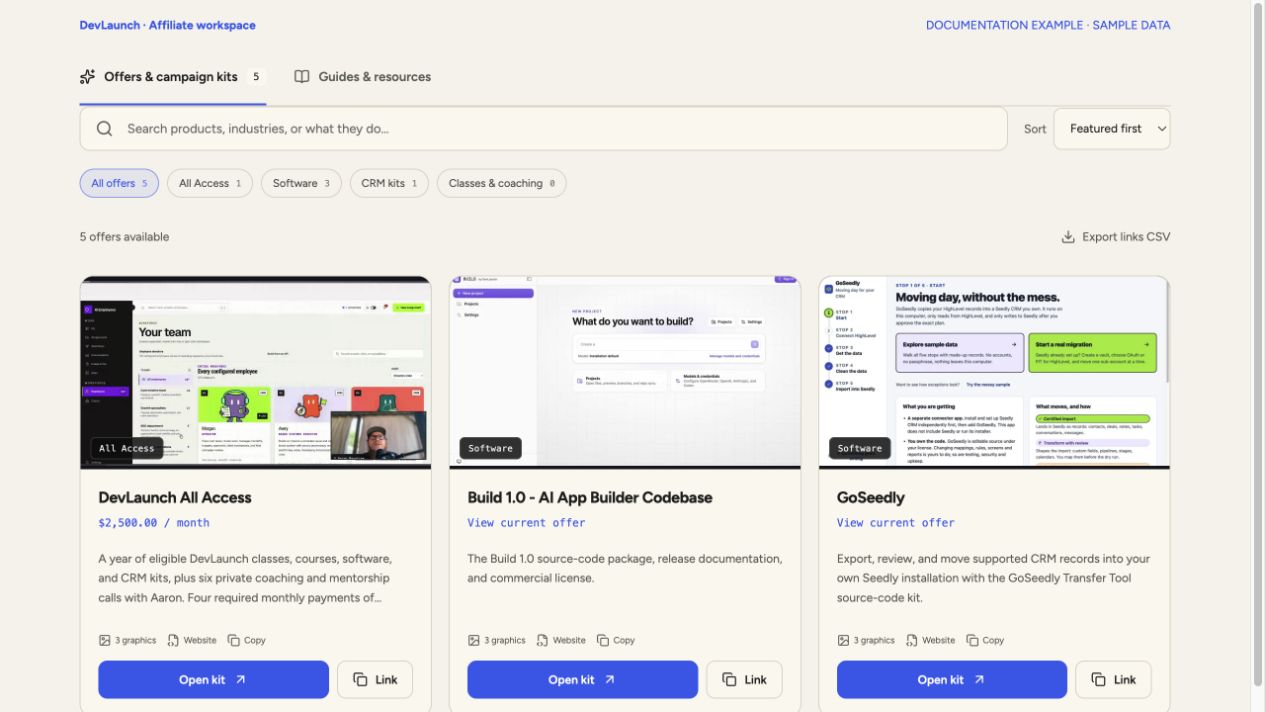
- Open Offers & campaign kits in the dashboard.
- Type a product, industry, or topic into Search affiliate offers. Try roofing, video, or Build.
- Use All Access, Software, CRM kits, or Classes & coaching to narrow the results. Search and category filters work together.
- Select Open kit on the offer you want. Review Full product details and the current price; similarly named offers may have different plans.
- If nothing appears, clear the search and category filters. Hidden or removed offers are not available in this workspace.
3. Use your personal checkout link
Choose Copy link inside the campaign kit, or Link on its offer card. The checkout URL contains ?a= followed by your connected Whop username. Keep that complete URL when you paste it into a post, email, or website button.
Full product details opens the official sales page for background information. That plain sales-page URL is not a substitute for the personal checkout link. A graphic alone does not carry affiliate attribution.
Export links CSV downloads the offers in your current filtered view. Treat the CSV as a snapshot and export it again after offer or username changes.
4. Prepare and publish
- Download a graphic and choose a copy template. Rewrite the draft in your own voice and use only claims you can support.
- Include an affiliate disclosure next to your recommendation. Example: I am a DevLaunch affiliate and may earn a commission if you purchase through my link.
- Open your final link and confirm the expected product, price, and your referral tag. You do not need to purchase to inspect the checkout.
- Share with a relevant audience, answer questions, and return to Whop to review results. A link click is not proof of a paid referral.